The AJAX Solr architecture
AJAX Solr follows the Model-View-Controller (MVC) pattern. The components of AJAX Solr are:
- ParameterStore: This is the model of an MVC framework. This class stores the Solr parameters and hence the state of the application.
- Manager: This acts as the controller in the MVC framework. It talks to the
ParameterStoreclass and sends requests to the Solr server and delegates the response received to the widgets for rendering. - Widgets: Widgets act as views rendering the interface.
Note
AJAX Solr library can be downloaded from using the Git client and the following command:
git clone https://github.com/evolvingweb/ajax-solr.git You will need to install the Git client on your machine to execute this command. For Linux users, Git can be installed using the following command:
sudo apt-get install git Windows users can download Git from the following URL and install it on their machines: .
This will create a folder called ajax-solr with the following sub-folders:
core: This sub-folder includes all the managers, parameter stores, and abstract widgetsmanagers: This sub-folder includes all the framework-specific managerswidgets: This sub-folder includes all framework-specific widgetsexamples: This sub-folder includes working examples
AJAX Solr is built with extensibility in mind. Therefore, we can take an existing class and extend its functionality by writing a new class that inherits the existing class. AJAX Solr classes reside in the AjaxSolr namespace. In order to extend any class, we can simply write:
AjaxSolr.ChildClass = AjaxSolr.ParentClass.extend({ /* our code */ });The architecture of the components of AJAX Solr can be understood from the following image:
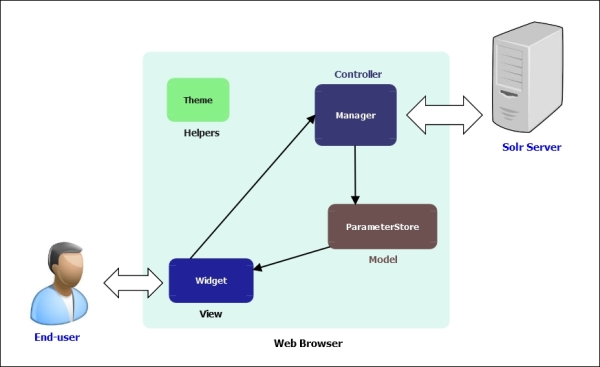
Let us understand the components of AJAX Solr.
Note
In order to use AJAX Solr, we will need to include the following JavaScript libraries on our web page:
<script type="text/javascript" src="ajax- solr/core/Core.js"></script> <script type="text/javascript" src="ajax- solr/core/AbstractManager.js"></script> <script type="text/javascript" src="ajax- solr/managers/Manager.jquery.js"></script> <script type="text/javascript" src="ajax- solr/core/Parameter.js"></script> <script type="text/javascript" src="ajax- solr/core/ParameterStore.js"></script>
Also, we will need an AJAX library for which we can download jQuery from: .
We also include jQuery the library in our web page:
<script type="text/javascript" src="jquery- 1.11.2.min.js"></script>
The Manager controller
The Manager controller performs a two-way communication with our Solr server. It accepts solrUrl or proxyUrl as its parameter. SolrUrl is used when Manager communicates with Solr directly. ProxyUrl is used when it interacts with Solr through a proxy. Ideally, we would not like to expose our Solr server to the Internet, so we can put it behind a proxy server and specify ProxyUrl in the Manager. The proxy server can also be configured to prevent Denial of Service (DoS) attacks and ensure the number of records in the result set is at a maximum (by restricting the row parameter).
The solrUrl parameter should hold the absolute URL of the Solr application and can be represented using the following code snippet:
Manager = new AjaxSolr.Manager({ solrUrl: "http://127.0.0.1:8983/solr/" });In our case, the Solr server is on the local machine, so we have specified the local machine's IP address.
In the implementation of the solrUrl parameter, AJAX Solr uses the select servlet by default. If you want to change the default value of the servlet parameter, you need to pass the servlet parameter to Manager at the time of initialization, as shown in the following code snippet:
Manager = new AjaxSolr.Manager({ solrUrl: 'http://127.0.0.1:8983/solr/', servlet: 'readonly' });The Manager life cycle can be represented using the following image that shows how the different components of AJAX Solr interact with each other.
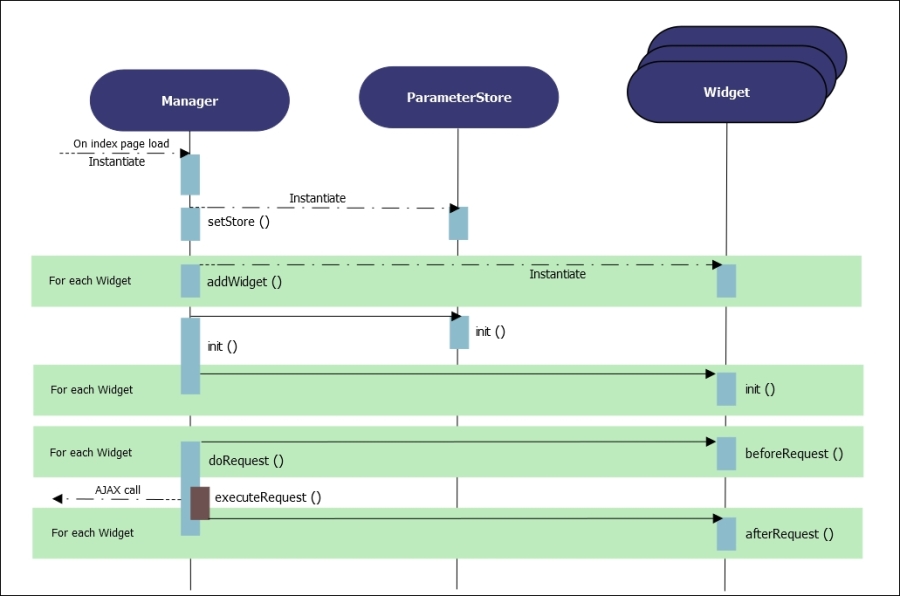
The ParameterStore object can be attached to Manager by the setStore method, as shown in the following snippet:
Manager.setStore(new AjaxSolr.ParameterStore());
Similarly, the widgets to be used for display can be attached to Manager by using the addWidget method, as shown in the following snippet:
Manager.addWidget(new AjaxSolr.AbstractWidget({ id: 'identifier', target: '#css-selector' }));Once parameterStore and widgets are attached to Manager, we can call the init method of the Manager to initialize AJAX Solr. This in turn calls the init methods of the attached components, ParameterStore and widgets.
Manager.init();
Once Manager is initialized, we can call the doRequest() method to send the first request to Solr:
Manager.doRequest();
If any widget wishes to perform an action prior to sending the request to Solr (for instance, displaying throbber gif image), doRequest triggers the beforeRequest method of each of the widgets. The throbber may include activities such as content download, computation of some values, or interaction with an external device. Then, the executeRequest abstract method is called that actually sends the request to Solr. The AJAX implementation of Solr is JavaScript framework agnostic. Any framework supporting AJAX implementation can be used to send the AJAX request to Solr. This is handled by the Manager.jquery.js file, which resides in the managers folder inside the ajax-solr library. This implements the executeRequest method using jQuery. As soon as the Manager receives a response from Solr, it captures the JSON response in its response property. It then triggers the afterRequest method of each widget so that the response property is investigated by the widgets and rendered to the interface accordingly.
The ParameterStore model
The parameterStore model is used to store Solr parameters. It defines functions for fetching, setting, and removing Solr parameters. Some Solr parameters, such as facet.field and fq, may be specified multiple times. Other parameters, such as q and start, may be specified only once. There is the isMultiple method, which returns true if the parameter can be specified multiple times.
There is a list of functions that operate on Solr parameters, and their behavior is based on whether a specific parameter needs to be used multiple times or just once. These functions can be categorized as follows:
- Available parameters: Parameters that are directly available for us to use
- Exposed parameters: Consists of parameters that are exposed by AJAX Solr for the end users to play around with
Let us understand these categories.
Available parameters
Solr parameters are represented as Parameter objects. The Parameter class defines the following attributes and functions for its usage:
val: This attribute gets and sets the parameter valuelocal: This attribute gets and sets local parametersremove: This attribute removes the local parametersstring: This attribute returns the parameter as a query string key-value pairparseString: This attribute parses the query string key-value pair back into a parametervalueString: This attribute returns the parameter value as a query string-safe valueparseValueString: This attribute parses the query string-safe value back into a parameter value
The following is a list of parameters that are available for use:
CoreQueryParameters()CommonQueryParameters()HighlightingParameters()SimpleFacetParameters()TermsComponent()TermVectorComponent()SpellCheckComponent()StatsComponent()LocalParams()MoreLikeThis()
Exposed parameters
With exposed parameters, widgets allow end users to alter the Solr parameters. This means that, if an end user modifies the value of a parameter, the application reacts to the change that has been triggered by the end user. It is important to save the respective states in case the end user performs a bookmark trigger or wants to move across the states using the browser navigation button. Though we can implement our custom storage method by extending ParameterStore (discussed in the Extending the ParameterStore class section of this chapter), the easiest way is using the ParameterHashStore class that stores the parameters in the URL hash.
Using the ParameterHashStore class
The ParameterHashStore class stores Solr parameters in the URL hash. To use ParameterHashStore, add its JavaScript file, which is available inside the core folder of the ajax-solr library:
<script type="text/javascript" src="ajax- solr/core/ParameterHashStore.js"></script>
Before calling the Manager.init() function, create a new object out of ParameterHashStore and set it as a store for the Manager using the following code:
Manager.setStore(new AjaxSolr.ParameterHashStore());
Also, the following code lists the Solr parameters that your widget will expose and allow the user to set or change as this store's property.
Manager.store.exposed = [ 'fq', 'q', 'start' ];
Using these two lines, we can use ParameterHashStore in our implementation of AJAX Solr.
Extending the ParameterStore class
The init method of Manager calls the init abstract method of ParameterStore. When extending the ParameterStore class, it is important to implement its init method so that any one-time initializations are handled using this init method. Also, the parameters that we want our widgets to allow the users to use directly or indirectly in the exposed property. The method exposedString can be used to retrieve these parameters as a query string.
The Manager class calls the save abstract method in its doRequest method. This also means that the save method is triggered once before each request is sent to Solr. The save method should be capable of storing the values of the exposed parameters such that the end user is able to bookmark and move between states. The ParameterHashStore class implements the save method in order to store the state in the URL hash.
Another method, storedString, returns the current state of the application as a string. It is implemented by ParameterHashStore in order to return the URL hash.
If we want to implement our own storage method instead of using ParameterHashStore, we need to implement only two abstract methods, save and storedString. We can also implement the load method, which by default resets the exposed parameters by calling the exposedReset method. It also calls the parseString method on the string returned by storedString thereby recreating the parameter object.
Widgets
The purpose of widgets is to inspect the JSON response retrieved from Solr by Manager and update the interface accordingly. AbstractWidget is the base class from which all widgets are inherited. Each widget accepts two parameters:
id: A mandatory identifier that identifies the widgettarget: An optional parameter that is normally the CSS selector for the HTML element that the widget updates upon each Solr request
The AbstractWidget base class exposes three abstract methods:
init: Triggered by theinitmethod ofManagerto perform one-time initializationsbeforeRequest: Triggered by thedoRequestmethod ofManagerprior to the request being sent to SolrafterRequest: Called by thehandleResponsemethod ofManagerafter receiving a response from Solr
AJAX Solr defines a set of abstract widgets that we can use to write our own widgets. In order to benefit from the functions that are contained in these widgets, we just need to write a new widget that inherits one of the following widgets:
AbstractFacetWidget: It is applied to the new widgets that intend to manipulate thefqparameter and has been discussed in the Adding facets section of this chapterAbstractSpatialWidget: It is applied to the widgets that manipulate the Spatial Solr local parametersAbstractSpellcheckWidget: It helps us write widgets that deal with the spell-check data in the Solr responsePagerWidget: It applies to the widgets that are intended for performing pagination activities and have been discussed in the Adding pagination section of this chapterAbstractTextWidget: It helps us write widgets that manipulate theqparameter