Apress Pocket Guides
Apress Pocket Guides present concise summaries of cutting-edge developments and working practices throughout the tech industry. Shorter in length, books in this series aims to deliver quick-to-read guides that are easy to absorb, perfect for the time-poor professional.
This series covers the full spectrum of topics relevant to the modern industry, from security, AI, machine learning, cloud computing, web development, product design, to programming techniques and business topics too.
Typical topics might include:
• A concise guide to a particular topic, method, function
or framework
• Professional best practices and industry trends
• A snapshot of a hot or emerging topic
• Industry case studies
• Concise presentations of core concepts suited for
students and those interested in entering the tech
industry
• Short reference guides outlining ‘need-to-know’
concepts and practices.
More information about this series a
.
Governance in
Microsoft 365 Copilot
& Copilot Studio
Practical Guardrails
and Checklists for Secure,
Responsible AI at Scale
Suvidha Shashikumar
Governance in Microsoft 365 Copilot & Copilot Studio: Practical
Guardrails and Checklists for Secure, Responsible AI at Scale
Suvidha Shashikumar
Sammamish, WA, USA
ISBN-13 (pbk): 979-8-8688-2343-5
ISBN-13 (electronic): 979-8-8688-2344-2
Copyright © 2026 by Suvidha Shashikumar
This work is subject to copyright. All rights are reserved by the Publisher, whether the whole or part of the material is concerned, specifically the rights of translation, reprinting, reuse of illustrations, recitation, broadcasting, reproduction on microfilms or in any other physical way, and transmission or information storage and retrieval, electronic adaptation, computer software, or by similar or dissimilar methodology now known or hereafter developed.
Trademarked names, logos, and images may appear in this book. Rather than use a trademark symbol with every occurrence of a trademarked name, logo, or image we use the names, logos, and images only in an editorial fashion and to the benefit of the trademark owner, with no intention of infringement of the trademark.
The use in this publication of trade names, trademarks, service marks, and similar terms, even if they are not identified as such, is not to be taken as an expression of opinion as to whether or not they are subject to proprietary rights.
While the advice and information in this book are believed to be true and accurate at the date of publication, neither the authors nor the editors nor the publisher can accept any legal responsibility for any errors or omissions that may be made. The publisher makes no warranty, express or implied, with respect to the material contained herein.
Managing Director, Apress Media LLC: Welmoed Spahr
Acquisitions Editor: Ryan Byrnes
Editorial Assistant: Gryffin Winkler
Cover designed by eStudioCalamar
Distributed to the book trade worldwide by Springer Science+Business Media New York, 1
New York Plaza, New York, NY 10004. Phone 1-800-SPRINGER, fax (201) 348-4505, e-mail
, or visit press Media, LLC is a Delaware LLC and the sole member (owner) is Springer Science + Business Media Finance Inc (SSBM Finance Inc). SSBM Finance Inc is a Delaware corporation.
For information on translations, please e-m
reprint, paperback, or audio rights, please e-m
Apress titles may be purchased in bulk for academic, corporate, or promotional use. eBook versions and licenses are also available for most titles. For more information, reference our Print and eBook Bulk Sales web page a
Any source code or other supplementary material referenced by the author in this book is available to readers on GitHub. For more detailed information, please vis
.
If disposing of this product, please recycle the paper
This book is dedicated to the enterprise leaders, architects, and teams I have had the privilege to work with – those
who asked the hard questions, challenged assumptions,
and insisted that AI be built with responsibility, trust, and purpose.
It is also dedicated to AI itself: a powerful mirror of
human intent, reminding us that governance is not
about control but about wisdom in how we choose to
build and scale intelligence.
Table of Contents
About the Author �������������������������������������������������������������������������������xiii About the Technical Reviewer ������������������������������������������������������������xv Introduction ��������������������������������������������������������������������������������������xvii Section 1: Foundations of AI Governance ������������������������������������1
vii
Table of ConTenTs
Section 2: Microsoft 365 Copilot Governance ����������������������������39
viii
Table of ConTenTs
Section 3: Copilot Studio and Advanced Governance ����������������67
ix
Table of ConTenTs
x
Table of ConTenTs
Section 4: Reference and Future Outlook ����������������������������������97
xi

About the Author
Suvidha Shashikumar is a Principal Solutions
Architect at Microsoft specializing in low-
code AI adoption, governance, and enterprise
transformation. She works closely with
Microsoft partners and enterprise customers
to design and implement secure, scalable
solutions using Microsoft 365 Copilot, Copilot
Studio, Power Platform, and Azure AI.
With over a decade of experience
in technology consulting and solution
architecture, Suvidha has led AI enablement workshops, governance frameworks, and innovation programs across industries, including healthcare, retail, manufacturing, and finance. She has presented at global conferences, coached teams at hackathons, and authored technical blogs and adoption guides that help organizations translate AI capabilities into measurable business value.
Suvidha is recognized for her ability to bridge technical depth with business strategy, making complex topics clear, actionable, and aligned with organizational goals. Her passion lies in helping enterprises harness AI responsibly, ensuring that innovation and governance work hand in hand.
xiii

About the Technical Reviewer
Malar Mangai Kondappan is a system architect
and integration engineering leader with over
20 years of experience designing cloud-native,
API-driven platforms in the insurance and
financial services domains. She specializes in
turning complex business intent into resilient
system architectures, using event-driven
microservices, high-throughput data pipelines,
and secure interoperability patterns that enable
real-time quoting and decisioning at scale.
Her work spans mission-critical quoting
engines, external lead acquisition platforms,
and end-to-end ecosystem integrations that connect digital experiences, risk platforms, and core transactional systems into a coherent whole.
Alongside her architecture work, she actively explores how AI-assisted and “vibe-first” development practices can turn natural- language intent into robust production architectures, closing the gap between whiteboard concepts and running code.
Malar is known for calm, principled leadership: she designs
opinionated technical guardrails, mentors globally distributed teams, and brings structure to ambiguity in high-stakes, time-sensitive initiatives.
She champions practices that let engineers collaborate with AI tools responsibly using clear domain models, resilient backend design, and iterative feedback loops so that experimental coding styles still result in secure, scalable, and maintainable systems.
xv
Introduction
AI is no longer a future idea. It is already part of everyday work.
It is changing how people write, analyze, collaborate, and make decisions, often with just a simple prompt. But behind that ease sits a more complex reality: access to enterprise data, automated reasoning, and systems operating at scale.
That is where the real challenge begins.
The question today is not whether to adopt AI, but how to do it responsibly, without slowing innovation or compromising security.
This Playbook is a practical guide for leaders and architects navigating that shift. It connects strategy with execution, showing how AI is applied in real enterprise environments using Microsoft 365 Copilot and Copilot Studio and how these tools can be introduced in a way that delivers business value while remaining governed and secure.
AI works best when innovation and guardrails move together.
This Playbook shows you how to build both.
xvii
CHAPTER 1
Why Governance
Matters in the Age
of AI Agents
Artificial intelligence is no longer a background tool – it’s an active teammate. With Microsoft 365 Copilot and Copilot Studio, AI now drafts, analyzes, and takes action within the very systems that power your business. That level of capability requires clear boundaries. This chapter explores why governance is essential for responsible innovation – how to maintain speed and creativity without sacrificing control, and how to build a framework that ensures Copilot and Agents operate in alignment with your goals, not outside them.
Before we explore the principles and practices of AI governance, it’s important to understand how Microsoft 365 Copilot, Copilot Studio, and your organizational data actually fit together.
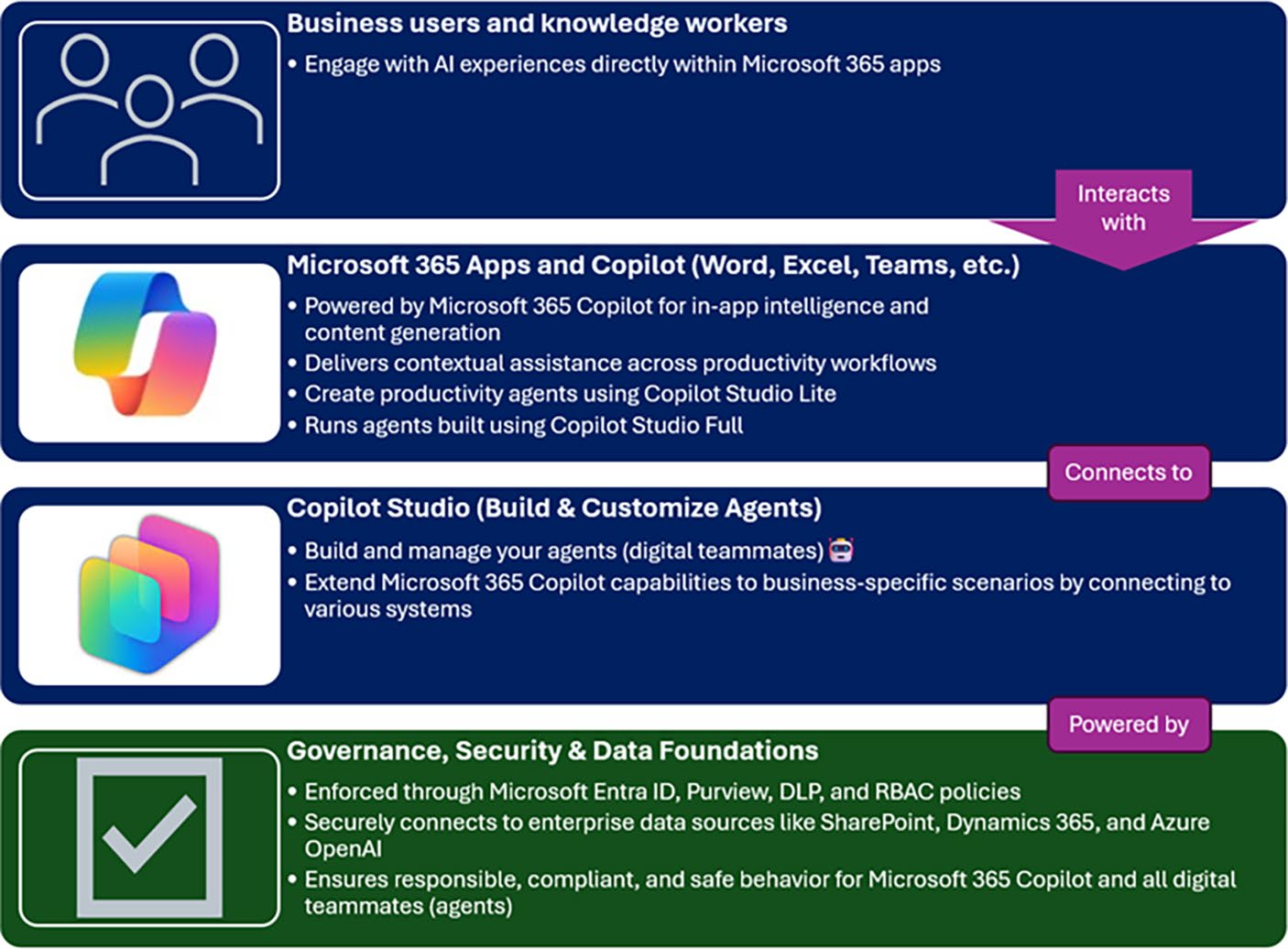
Figurtrates the core layers of the Microsoft 365 Copilot and Copilot Studio ecosystem – how users interact with AI, where digital teammates (agents) operate, how they are built, and which governance foundations keep everything secure and compliant.
© Suvidha Shashikumar 2026
3
S. Shashikumar, Governance in Microsoft 365 Copilot & Copilot Studio, Apress Pocket Guides
Chapter 1 Why GovernanCe Matters in the aGe of ai aGents
Figure 1-1. Microsoft 365 Copilot and Copilot Studio ecosystem.
Business users interact with AI experiences inside Microsoft 365
apps, where digital teammates (agents) run and deliver contextual intelligence. Copilot Studio is where those agents are built and customized. Governance, security, and data foundations power the entire stack, enforcing trust, compliance, and responsible AI behavior Introduction: The Shift Toward
AI-Assisted Works
We’re living through one of the biggest shifts in the history of workplace technology. AI has moved from a distant idea to rules-based automation, and now to adaptive, generative systems that can write, reason, 4
Chapter 1 Why GovernanCe Matters in the aGe of ai aGents summarize, and act. With Microsoft 365 Copilot and the agent-building capabilities of Copilot Studio, that shift finally shows up inside the day-today tools you and your teams use every single day.
If you’ve been in the Microsoft 365 ecosystem for a while, you already know the difference between a tool and a teammate. A tool waits for your command. A teammate anticipates, suggests, drafts, restructures, and sometimes takes the first step. That’s the leap Copilot introduces. You’re no longer just clicking buttons – you’re collaborating with an agent that can understand your intent and take action with you.
That new power brings extraordinary upside. Copilot drafts your first paragraph, reshapes a spreadsheet, summarizes a meeting you missed, kicks off a workflow, or retrieves insights you didn’t know existed. But the moment an agent can reason over your tenant’s data, call APIs, interact with Microsoft Graph, or execute actions on behalf of a user, everything changes. You’re responsible not only for what the agent outputs – but also for what it accesses, what it infers, and what it is allowed to do.
That responsibility is governance.
Governance is how you ensure your AI ecosystem remains secure, compliant, intentional, and predictable – even as agents become more capable. It’s how you protect your organization’s data estate, earn trust with your users and customers, and create the conditions for responsible innovation instead of accidental chaos.
In this book, I stay practical. You’ll understand the controls to configure, the policies to enforce, and the reviews that matter. My goal is simple: help you scale Microsoft 365 Copilot and Copilot Studio agents with confidence – without turning your organization into one big pilot that never quite takes off.
5
Chapter 1 Why GovernanCe Matters in the aGe of ai aGents What We Mean by “Governance”
When we say “governance,” we don’t mean a dusty binder full of unread policies. We mean a living system that enables you to move fast without compromising trust. We’ll treat governance as both design and discipline:
• Design is how you shape the boundaries before anyone uses Copilot: which users are eligible, which
data is in scope, which connectors are allowed, how
environments are structured, and how identities and
permissions flow through the system.
• Discipline is how you keep those boundaries healthy after Copilot is live: monitoring prompts and usage,
attesting to access and intent, reviewing drafts, and
stepping in when something doesn’t look right.
In Microsoft terms, design shows up in tenant and environment choices, licensing strategy, Graph permissions, SharePoint site scoping, sensitivity labels, DLP policies, Conditional Access, and which connectors you approve. Discipline is reflected in Purview auditing, Copilot usage analytics, cost and consumption reporting, life cycle reviews, and incident response – including revoking permissions or decommissioning agents when thresholds are crossed.
If you do this well, governance doesn’t slow you down. It’s the runway that lets more teams adopt Copilot, earlier and safer, with fewer surprises.
The Governance Imperative: Your Blueprint
for Responsible Innovation
Governance in the age of AI is a strategic imperative that ensures AI works for your organization, aligns with human values, and meets social expectations. As tools like Microsoft Copilot gain the ability to read, 6
Chapter 1 Why GovernanCe Matters in the aGe of ai aGents summarize, and act across your enterprise systems, the question shifts from “What can Copilot do?” to “What should it do?”
A strong governance model empowers your organization in four
essential ways:
1. Protect What Matters
Define what data is in scope, apply sensitivity labels,
and enforce DLP and Conditional Access policies.
This ensures agents only access what they need –
nothing more.
2. Build Accountability and Transparency
Use tools like Microsoft Purview to log prompts and
actions, creating a clear audit trail. Every AI-driven
decision can be traced and explained, not guessed.
3. Set Ethical Boundaries
Proactively check for bias in data and prompts.
Ensure your Copilot and agents behave
fairly, consistently, and in line with your
organization’s values.
4. Scale with Confidence
Make governance repeatable. With reusable controls
and processes, new teams can adopt AI safely –
without reinventing the guardrails.
An ungoverned agent might not break a law today,
but it can break trust tomorrow. Your job is to
stay ahead of that curve – keeping governance
clear, adaptive, and built for a world where digital
coworkers are real.
7
Chapter 1 Why GovernanCe Matters in the aGe of ai aGents The Risks That Demand Guardrails
for Copilot Agents
AI introduces a new class of risks that traditional IT governance models were never designed to manage. We can categorize these into four main areas that directly impact your deployment of Copilot and Copilot Studio agents.
Data Privacy and Security Risk is paramount because Copilot agents thrive on access to vast, often sensitive, corporate data to function effectively. Without strong security and access controls, this fundamental need becomes a major liability. You must ensure that agents adhere to the principle of least privilege – accessing only the data strictly necessary for their task – to prevent breaches and regulatory violations.
Next is Bias and Fairness Risk. Models learn from historical data, and if your training data reflects existing organizational or social biases, the agent will replicate or even amplify them. Governance, in this context, requires fairness checks and the use of diverse datasets to prevent discriminatory outcomes, particularly when agents assist in decisions concerning hiring, resource allocation, or customer service.
Then there’s the Transparency and Accountability Risk. AI decisions can feel opaque. When an intelligent agent summarized a proposal or initiated a workflow, you need to understand how the decision was reached and who is responsible if the outcome is flawed. Governance provides the tools and processes to log, audit, and explain the steps an agent takes, ensuring that its actions are not a “black box.”
Finally, Operational and Reputational Risk arises because agent systems can fail in unpredictable ways or produce outputs that are factually incorrect. A poorly governed agent can quickly damage your organization’s reputation and lead to costly operational failures.
Governance ensures robust monitoring, clear escalation paths, and necessary fallback mechanisms are in place.
8
Chapter 1 Why GovernanCe Matters in the aGe of ai aGents These risks, taken together, clearly demonstrate that embedding governance is not merely important but an unavoidable necessity for safe AI adoption.
Why Governance Helps You Go Faster
You move faster when people trust the system. We’ve seen rollouts stall because the first bad demo becomes the only story anyone remembers. A governed Copilot program earns the opposite reputation: “it just works, and when it doesn’t, we know why.”
Practically, that means you will
• Start from a clear eligibility model: Who gets which AI capabilities and why.
• Launch into environments that match intent: A safe
space to build and learn, a controlled space to pilot,
and a production space to operate at scale.
• Keep a short list of “known good” data sources and
connectors that teams can rely on without asking Legal
every time.
• Offer simple, visible controls to pause an agent, narrow
its scope, or adjust its permissions when the situation
demands it.
• Show leadership usage, value, and cost in one place.
That last point matters. When you can open a dashboard that ties usage to outcomes and spend, you don’t argue about anecdotes – you steer with evidence.
9
Chapter 1 Why GovernanCe Matters in the aGe of ai aGents
Agent Evolution and the Need for Guardrails
AI agents – like those in Microsoft 365 Copilot and Copilot Studio – are becoming more autonomous. They handle tasks, make decisions, and interact with users. Without clear boundaries, these agents may act in ways that conflict with organizational values or compliance requirements.
Governance ensures that agents operate within defined ethical and operational parameters, are consistently monitored and auditable, and remain aligned with enterprise goals as well as user expectations.
Phases of Enterprise Agent Adoption
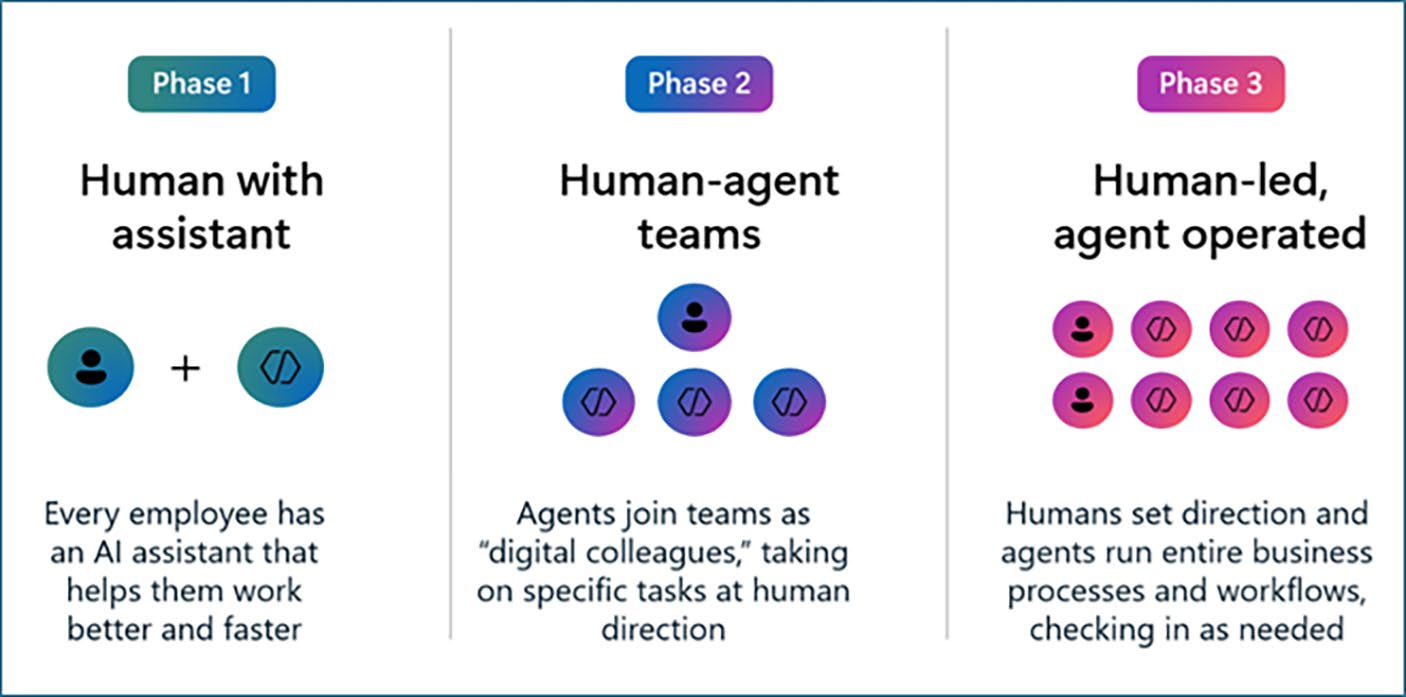
Organizations are seeing a three-phased approach in adopting and scaling AI. CIOs should assess agent maturity in the workplace and adjust oversight as solutions become more advanced and widely adopted.
Figure 1-2. Three phases of the Agent Maturity Curve – showing how oversight must increase as agent autonomy progresses. (Source: The Microsoft’s CIO Playbook to Governing Agents in Low code)
10
Chapter 1 Why GovernanCe Matters in the aGe of ai aGents As seen in Figuree phases of the Agent Maturity curve include
Phase 1: Human with Assistant, where agents
summarize, automate small tasks, and respond to
prompts, such as basic M365 Copilot functions. At
this stage, governance focuses primarily on access
controls, user education, and initial data flow
logging.
Phase 2: Human–Agent Teams, where agents
collaborate with humans on structured tasks like
data analysis or complete business workflows.
Here, governance must define validation methods,
compliance checks, and performance metrics.
Phase 3: Human-Led, Agent-Operated. This is
where agents take on operational processes with
minimal human input, such as a custom Copilot
Studio agent managing a service queue. Governance
now demands life cycle tracking, real-time
permission controls, and treating the agent as
“digital labor.”
As you can see in Figurtatic controls won’t suffice. Adaptive oversight is essential, scaling governance as agents grow more autonomous and complex. This layered approach ensures that the governance framework flexes to the agent’s needs rather than forcing it into a rigid, performance-stifling box.
11
Chapter 1 Why GovernanCe Matters in the aGe of ai aGents Tiers of Adaptive Human Oversight
Microsoft defines adaptive oversight as a dynamic governance model that evolves with agent autonomy. It introduces three key roles to maintain control and accountability:
First, we rely on Reviewers. These individuals verify the agent’s output for factual accuracy, relevance, and compliance before the information is finalized or executed.
Next, we have Monitors. They track agent actions and performance over time, triggering follow-up or intervention when the agent deviates from expected behavior or metrics.
Finally, there are the Protectors. These individuals or automated systems have the ability to adjust or restrict an agent’s permissions, or even decommission it, in real time if critical risk thresholds are crossed.
This multi-tiered model ensures that, regardless of how complex your Copilot Studio agent becomes, a human element is always in the loop, providing the necessary boundaries.
Organizational Readiness: Culture
and Leadership
Governance is about more than just tools and processes; it is
fundamentally about organizational culture and leadership commitment.
For your AI strategy to succeed, you must focus on four pillars of readiness.
First, Leadership Support is vital. Executive sponsorship provides the necessary vision, resources, and accountability for a successful enterprise-wide governance framework. Second, you need a Clear Operating Model.
This means you must decide whether the creation and deployment of AI agents will be centrally managed or distributed across business units, and clearly define the guardrails for each model. Third, Cross-Functional Collaboration is non-negotiable. Governance cannot reside solely within 12
Chapter 1 Why GovernanCe Matters in the aGe of ai aGents IT or Legal; engaging experts from business domains, ethics, security, and human resources ensures that AI addresses real needs while managing real risks. Fourth, your approach must embrace Change Management. AI evolves rapidly, so your organization must prioritize agility and continuous improvement over waiting for a perfect, static solution.
Governance should be your blueprint for safe scaling and resilience, not a barrier.
Key Takeaways
• Governance is not a compliance exercise – it’s the
structure that lets you innovate safely.
• Treat governance as both design (how you set
boundaries) and discipline (how you keep them
healthy).
• Protect data, ensure accountability, uphold ethics, and
make controls repeatable.
• The more autonomous your agents become, the more
adaptive your oversight must be.
• Culture and leadership matter as much as policy – trust
is your fastest path to scale.
13
CHAPTER 2
Responsible AI
Principles in Practice
Every organization wants to innovate with AI – but doing it responsibly is what separates experimentation from leadership. Responsible AI isn’t theory; it’s the framework that helps you design systems people can trust.
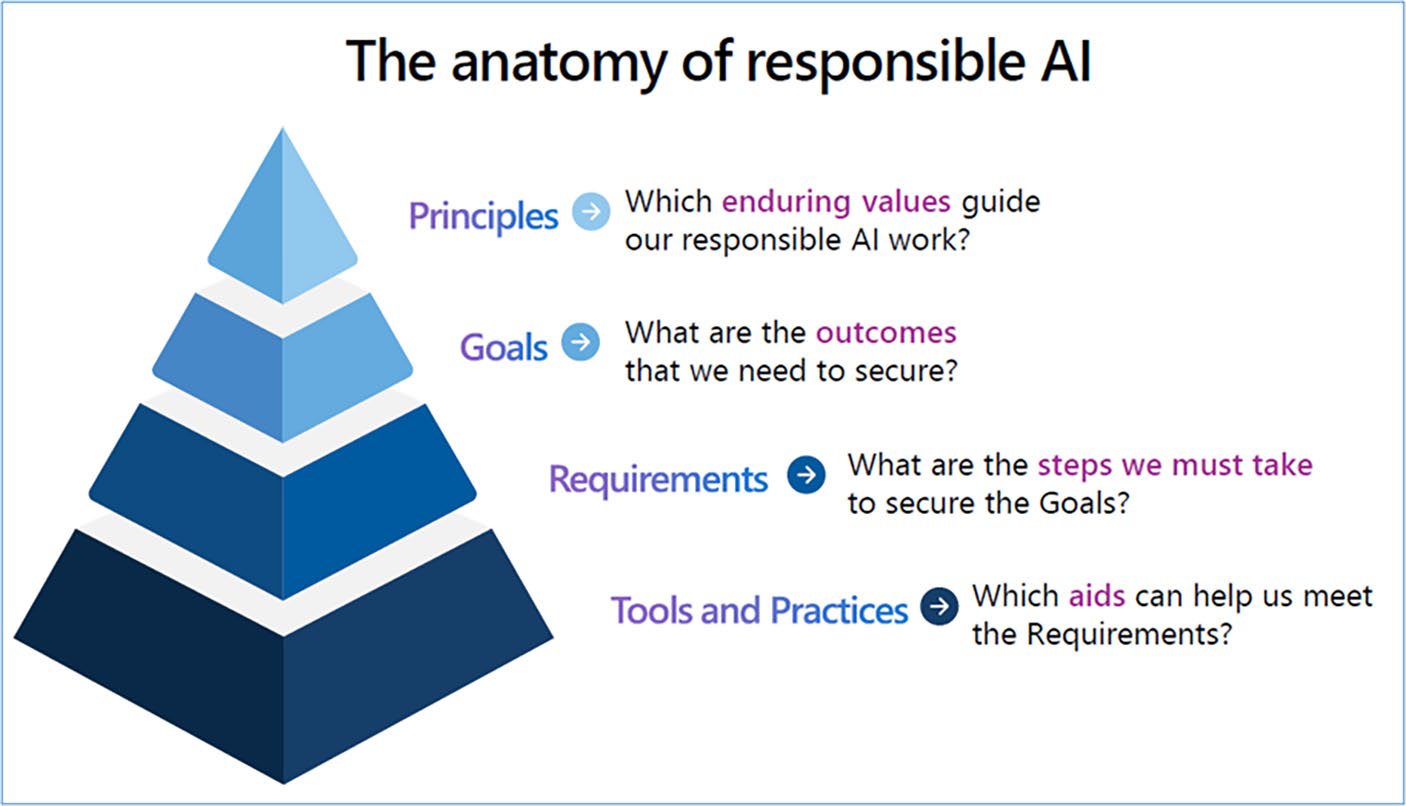
Microsoft defines Responsible AI through a layered model – from principles to tools – that guides how governance is implemented across the enterprise. Figurtrates how Microsoft’s Responsible AI principles cascade from high-level values to operational tools, forming the layered model that guides governance implementation across the enterprise.
© Suvidha Shashikumar 2026
15
S. Shashikumar, Governance in Microsoft 365 Copilot & Copilot Studio, Apress Pocket Guides
Chapter 2 responsible ai prinCiples in praCtiCe
Figure 2-1. Anatomy of Responsible AI – illustrating how Microsoft’s Responsible AI principles cascade from principles to operational tools. (Source: The Microsoft’s CIO Playbook to Governing Agents in Low code)
In this chapter, I’ll walk you through how to translate Microsoft’s Responsible AI principles – fairness, reliability and safety, privacy and security, inclusiveness, transparency, and accountability – into practical steps for Microsoft 365 Copilot and Copilot Studio.
You’ll learn how to configure your environments, control data access, test for bias, document ownership, and create review loops that keep human judgment in the process. These principles aren’t abstract – they’re the foundation for every governance decision you’ll make as you bring AI into daily work.
16
Chapter 2 responsible ai prinCiples in praCtiCe Building Intelligence with Intention
Every AI system begins with a purpose. You’re not adopting AI to impress your organization with cutting-edge technology – you’re shaping how people think, decide, and create.
Responsible AI keeps that purpose visible while you build. It
transforms broad values – fairness, safety, privacy, transparency, and accountability – into daily configuration and operational choices in Microsoft 365 Copilot and Copilot Studio.
When you design with intent, governance becomes an act of design, not restriction. The decisions you make about what data AI can access, who can build agents in Copilot Studio, and how those agents are reviewed, will shape the culture of trust around AI in your organization.
CIOs must define the goal of each deployment. Whether it’s reducing manual reporting or surfacing insights, your purpose determines which principles take priority – and which controls must be in place from day one.
Fairness: Designing for Equitable Outcomes
Fairness starts with the data AI can see and use. Because Microsoft 365
Copilot reasons over Microsoft Graph – spanning SharePoint, Teams, OneDrive, and Exchange, you decide which repositories and groups are in scope. If the data is skewed, so is the outcome.
Start by reviewing your sensitivity labels and permissions. Ensure that information across departments, geographies, and roles is represented proportionally. For example, if only one region stores structured project updates, Copilot’s summaries will over-index on that region’s perspective.
17
Chapter 2 responsible ai prinCiples in praCtiCe In Copilot Studio, test your custom agents with sample prompts from different user types – marketing, finance, field operations – and confirm the responses remain balanced and factual. Add structured test cases into your ALM pipeline so fairness checks are automated with every release.
Bias doesn’t disappear on its own. Create a periodic review where you compare Copilot outputs against known baselines. If you detect imbalance, trace it back to a connector, dataset, or prompt pattern and adjust accordingly.
Reliability and Safety: Engineering
for Confidence
Reliability means predictability. When a user provides the same context, Copilot should respond consistently. You can build reliability through configuration discipline: control your data versions, use approved connectors, and separate experimentation from production environments.
In practice, this involves creating dedicated development
environments in Copilot Studio and enforcing solution segmentation through managed environments. Use Azure DevOps or GitHub pipelines to deploy tested versions of agents, ensuring that what users interact with has passed regression and performance validation.
Safety complements reliability. It focuses on protecting people and systems from unintended harm – technical, reputational, or ethical. Microsoft 365 includes built-in safeguards such as content filters, role-based access control, and message tracing. Augment those with your own monitoring:
• Enable Purview Audit (Premium) for prompt and
action visibility.
• Configure Data Loss Prevention to detect when
generated content references restricted terms.
• Use adaptive scopes to automatically apply
compliance policies to newly created workspaces.
18
Chapter 2 responsible ai prinCiples in praCtiCe Safety also means creating a clear escalation path. Decide who reviews flagged interactions and how corrective actions – such as disabling a connector or adjusting a sensitivity label – are executed without delay.
Privacy and Security: Guarding What
Matters Most
Privacy begins with data classification. Label your information before Copilot ever touches it. Use Microsoft Information Protection (MIP) to tag files and emails as Confidential, Internal, or Public. Copilot respects those labels, limiting what it can surface in responses.
Apply Conditional Access Policies so only compliant devices and trusted users can invoke Copilot. When connecting external data sources or APIs in Copilot Studio, review each connection string and authentication method. Always prefer Managed Identity or OAuth 2.0
with least-privilege scopes over static keys.
Turn on Customer Lockbox and Data Access Governance Reports if your compliance posture requires oversight of Microsoft-side access. For organizations under GDPR or similar frameworks, document where data used by Copilot resides and how long it’s retained.
Security goes beyond configuration. Educate your users: teach them what it means when Copilot says, “Based on your organization’s data…” .
Awareness remains the most effective security control you can implement.
Inclusiveness: Designing for Everyone
An inclusive Copilot experience ensures every employee gains from AI – not just those in headquarters or with perfect accessibility. Enable accessibility features like Immersive Reader, dictation, and screen-reader compatibility so Copilot outputs remain consumable to all.
19
Chapter 2 responsible ai prinCiples in praCtiCe During pilot phases, include diverse testers: different departments, seniority levels, and physical abilities. Capture how people interact with prompts and outputs. For instance, frontline staff may prefer brief, actionable summaries, while analysts might need detailed breakdowns.
Inclusiveness also means linguistic and cultural flexibility. If your tenant spans regions, verify that Copilot handles language preferences correctly and that content translation or summarization does not distort meaning. Feedback from global users often reveals prompt phrasing or terminology that needs adjustment.
By designing for inclusion, you build systems that reflect how people actually work – not how the documentation assumes they do.
Transparency and Accountability: Keeping
the Loop Human
Transparency allows people to understand and trust what Copilot is doing on their behalf. Document every agent’s purpose, owner, and data scope.
Store this inventory centrally – whether in a SharePoint list, Dataverse, or your governance center of excellence.
Use Microsoft Purview Audit Logs to capture when Copilot is invoked, what connectors were accessed, and which user initiated the action. Combine that data with Power BI to create dashboards showing adoption, output volume, and exceptions.
Accountability means someone is always responsible for every agent’s behavior. Assign an Agent Owner role for each Copilot Studio app and include it in your Data Life Cycle Management process. When an issue arises – a biased summary, an inaccurate forecast, a privacy incident – you can trace it to a person, a configuration, and a corrective action.
20
Chapter 2 responsible ai prinCiples in praCtiCe You can also strengthen accountability through attestation cycles: quarterly reviews where owners confirm that their agents still serve a valid purpose, follow approved data scopes, and comply with current security policies. These small habits create lasting reliability.
Bringing It All Together
Responsible AI is not a policy – it’s a practice. When you design for fairness, build for reliability, enforce privacy, welcome inclusiveness, and operate transparently, you establish a system that people trust instinctively.
Each principle supports the others. Fairness relies on transparency; reliability depends on accountability; privacy strengthens safety; inclusiveness amplifies fairness. Together, they turn governance into a framework that accelerates adoption instead of limiting it.
When you build and run Copilot with these principles in mind,
you move from experimentation to enterprise confidence. You’re not just enabling AI – you’re shaping how intelligence behaves inside your organization.
In the rest of this guide, you’ll see these principles show up as concrete decisions: how you classify data in Chapter , how you design environment and access controls in Chapter , and how you scale responsible agent usage in Chapter .
Key Takeaways
• Responsible AI translates organizational values into
everyday technical choices.
• Each principle – fairness, reliability, privacy,
inclusiveness, transparency, accountability – maps
directly to features in Microsoft 365 and Copilot Studio.
21
Chapter 2 responsible ai prinCiples in praCtiCe
• Automate fairness and reliability checks through
environment isolation, ALM pipelines, and Purview
analytics.
• Protect data through classification, least-privilege
access, and continuous auditing.
• Assign clear ownership and conduct regular attestation
so every agent remains purposeful and accountable.
• Practicing these principles turns Copilot into
a trustworthy extension of your organization’s
intelligence.
22
CHAPTER 3
Governance Personas
and Roles
Governance isn’t just about frameworks and tools – it’s also about people.
Every control, policy, and safeguard depends on someone defining it, approving it, or monitoring it. In this chapter, I’ll walk you through the key personas that make governance work inside Microsoft 365 Copilot and Copilot Studio. You’ll see how leaders, administrators, makers, and reviewers each play a distinct role in building responsible AI systems that stay secure, compliant, and aligned with business goals.
When every role is clear, governance stops feeling like oversight and starts functioning like teamwork.
Why Roles Matter
Governance always begins and ends with people. The best frameworks, policies, and tools still depend on someone interpreting, configuring, and enforcing them. As AI becomes part of daily work, responsibilities blur across IT, business, and compliance. That’s why role clarity is essential.
Defining governance personas brings structure to what could
otherwise become chaos. Each persona represents a perspective: leadership that sets direction, administrators who build and secure,
© Suvidha Shashikumar 2026
23
S. Shashikumar, Governance in Microsoft 365 Copilot & Copilot Studio, Apress Pocket Guides
Chapter 3 GovernanCe personas and roles
makers who innovate, and reviewers who keep outputs accountable.
Together, they form the human architecture that turns Responsible AI into a living practice inside Microsoft 365 Copilot and Copilot Studio.
When roles are clear, decision-making accelerates. People know where their authority begins and ends, who approves what, and how to escalate when something goes wrong. Governance stops feeling like bureaucracy and starts functioning like choreography.
Role Definitions
The Executive Sponsor
Every successful AI initiative begins with sponsorship. As the executive sponsor, you set the vision, provide purpose and legitimacy. You connect AI adoption to measurable business goals – improving efficiency, deepening insight, or freeing employees for higher-value work.
Your primary task is to make Responsible AI a leadership conversation, not a technical one. You approve the governance charter, allocate resources, and model accountability. When you champion transparency and ethical design, everyone else follows. You don’t need to manage the details of data residency or DLP rules, but you must set the expectation that those details matter.
The Governance Lead
If the sponsor sets the vision, you – the governance lead – design the system that supports it. You translate broad principles into process: defining how policies are created, how exceptions are handled, and how compliance is proven.
This role sits at the intersection of IT and business. You coordinate tenant strategy with administrators, align oversight with compliance officers, and ensure that new Copilot features or connectors enter through a controlled pathway. You document decision rights, schedule attestation cycles, and guide the governance council. Think of yourself as the architect who keeps every other role working from the same blueprint.
24
Chapter 3 GovernanCe personas and roles
The Microsoft 365 Administrator
Administrators make governance tangible. You decide how Copilot and agents behave in the tenant – the data it can reach, the connectors it can use, and the security boundaries that contain it.
Your daily work includes configuring Conditional Access, applying sensitivity labels, enforcing DLP policies, and monitoring telemetry through Microsoft Purview. When Copilot expands to new applications, you validate the impact before rollout. Reliable governance depends on your discipline: every setting you choose defines what “responsible” looks like in practice.
Security and Compliance Officer
If administrators decide how Copilot and agents run, you manage whether it should. You safeguard the organization’s ethical and regulatory posture, ensuring that every data flow respects retention, residency, and encryption standards.
Using tools like Purview Audit, Compliance Manager, and Defender for Cloud Apps, you watch how information moves through Copilot interactions. When new integrations appear – say, an external Graph connector – you assess risk before approval. In many ways, you act as the conscience of the system, ensuring innovation never outruns oversight.
The Maker
Makers are the creative energy behind M365 Copilot and Copilot Studio using Low-code. You design custom agents, build workflows, and experiment with automation that solves real problems. But your creativity lives inside guardrails.
You work in governed environments, use approved connectors, and document what each agent does and why. You test fairness, accuracy, and reliability before moving to production. When your agent succeeds, it becomes a proof point that innovation and governance can not only coexist, they strengthen each other.
25
Chapter 3 GovernanCe personas and roles
The Developer
While makers experiment and innovate within Low-code
environments, developers build enterprise-grade agents that integrate deeply with business systems, orchestrate complex workflows, and operate autonomously. Your work demands precision, accountability, and alignment with structured governance.
You use the full Copilot Studio experience alongside pro-code tools like Azure AI Foundry, Teams Toolkit, and Visual Studio Code to build robust, scalable agents. These agents implement secure authentication, authorization, and data flow design patterns. You participate in full Application Life Cycle Management – versioning, testing, deploying, and rolling back as needed across development, test, and production environments.
Once your agent meets functional and compliance standards, you submit it for Center of Excellence (CoE) certification before publishing it to the tenant catalog. Your role bridges innovation and infrastructure, turning vision into sustainable, secure, and compliant AI solutions.
Reviewers, Monitors, and Protectors
Once AI agents move beyond testing, three forms of oversight keep them accountable.
As a reviewer, you validate quality and compliance before an agent goes live – checking tone, accuracy, and data scope.
As a monitor, you track ongoing performance through dashboards and audit logs, watching for anomalies in usage or cost.
As a protector, you hold the authority to intervene: adjusting permissions, disabling connectors, or pausing agents that create risk.
In smaller teams, one person may cover all three functions; in larger enterprises, they become specialized roles within operations or security.
Together, they form the adaptive human loop that keeps AI trustworthy after launch.
26
Chapter 3 GovernanCe personas and roles
In Chapters ough , I’ll keep referring to these roles as we design tenant controls, environment strategy, and zoned governance. When you work through the checklists in Chapter , treat them as “who does what”
for each persona.
Building a Governance Council
No single role can sustain governance alone. AI governance succeeds when business, IT, and compliance leaders move in rhythm. That’s where the governance council (or Center of Excellence, CoE) comes in. It’s the connective tissue that keeps AI aligned with organizational values, strategy, and risk posture.
A strong council is cross-functional by design. It brings together executive sponsors, administrators, security and compliance officers, and the maker community – each offering a unique perspective on how AI is created, secured, and scaled. Together, they turn Responsible AI principles into everyday practice, deciding how AI initiatives are introduced, governed, and evolved across the enterprise.
A well-run council acts as the operating system for Responsible AI. It meets regularly to review agent proposals, track adoption and spend, evaluate data-sharing trends, and refine governance standards as Microsoft releases new capabilities. It also maintains a living inventory of agents – documenting ownership, data sources, and compliance status to create a single source of truth for audits and risk reviews.
When structured well, the governance council doesn’t slow innovation; it directs it. It gives creators clarity, leaders confidence, and administrators control. It ensures that when something changes – you already have the right people aligned on how to respond.
We’ll return to this Governance council/CoE model in Chapter
more in detail.
27
Chapter 3 GovernanCe personas and roles
Evolving with Maturity
Governance is never static. Roles shift as adoption matures and your organization moves from experimentation to enterprise scale. In the early stages, the governance lead and administrator often wear multiple hats –
drafting policy, configuring environments, and educating makers all at once. At this point, agility matters more than structure; you’re proving value while keeping risk in check.
As Copilot and agent usage expands, responsibilities start to
specialize. You’ll formalize reviewer and monitor functions, establish a governance council cadence, and delegate ownership closer to the business. Departmental champions or “mini-CoEs” begin to emerge –
people who understand both the local context and the enterprise guardrails. Governance shifts from being a centralized control function to a distributed practice that scales with adoption.
Eventually, governance becomes woven into the fabric of daily
work. Roles stabilize, metrics are tracked automatically, and audits feel routine rather than reactive. At this stage, Responsible AI isn’t a separate initiative – it’s simply how products are built, how data is handled, and how people collaborate.
The goal isn’t to design a perfect governance model once and call it done. The goal is to keep evolving it. The most resilient organizations treat governance not as a fixed structure but as a living system that grows smarter over time.
Key Takeaways
• Clear roles turn abstract governance into daily practice.
• Executive sponsors provide direction; governance
leads design structure; administrators, makers, and
compliance officers bring it to life.
28
Chapter 3 GovernanCe personas and roles
• Reviewers, monitors, and protectors maintain
continuous human oversight once agents are live.
• A governance council unites these perspectives to
adapt policy as AI matures.
• When everyone understands their part, governance
becomes the quiet system of trust that allows AI to
scale safely.
29
CHAPTER 4
Core Pillars of
AI Governance
As Copilot and agents become embedded in daily workflows and when you know who drives governance, the next question is what holds it together.
The answer lies in four foundational pillars: Security, Compliance, Data Management, and Operational Oversight. Each pillar plays a distinct role, but together they form the architecture of Responsible AI.
These pillars aren’t static checkboxes – they’re living systems that evolve with every new capability, connector, and integration. Security ensures only the right people have the right access. Compliance enforces accountability through policy. Data management keeps the information ecosystem clean, labeled, and discoverable. And operational oversight ensures AI behaves as intended, with continuous monitoring and improvement.
When these pillars work in harmony, governance shifts from being a control mechanism to a strategic enabler – helping innovation scale safely, predictably, and responsibly. Let’s look at how to build that architecture, one decision, one control, one review at a time.
© Suvidha Shashikumar 2026
31
S. Shashikumar, Governance in Microsoft 365 Copilot & Copilot Studio, Apress Pocket Guides
Chapter 4 Core pillars of ai GovernanCe
Security – Protecting Access and Identity
Security is the first pillar for a reason – everything else depends on it.
Microsoft 365 Copilot operates within the Microsoft 365 trust boundary, drawing from Microsoft Graph, SharePoint, Teams, and OneDrive, and inheriting your existing identity, access, and compliance controls through Entra ID (Azure AD). In contrast, Copilot Studio extends that boundary.
It allows makers and developers to connect with systems outside Microsoft 365 – whether through custom connectors, APIs, plugins, or external data sources. This flexibility unlocks powerful enterprise integration but also expands your attack surface. Every new connector or endpoint becomes part of your governance scope. That’s why Copilot Studio must operate under managed environments, where every connection is intentional, authenticated, and monitored.
Start with least-privilege access. Every Copilot or agent request runs under the identity of the signed-in user, so permissions in Entra ID
determine what data is visible. Review group memberships frequently, eliminate broad “Everyone” access in SharePoint libraries, and ensure external sharing is deliberate and justified.
Next, strengthen Conditional Access policies to limit Copilot usage to compliant devices and trusted networks. If users can reach sensitive data through Copilot, their devices must meet your baseline for encryption, patching, and sign-in risk.
For Copilot Studio, isolate maker environments. Give creators dedicated development spaces with role-based access to connectors and data. Managed environments and Power Platform security groups provide guardrails so experimentation stays contained and auditable.
Finally, remember that security isn’t a one-time setup – it’s a living discipline. Review access reports and audit logs regularly to detect unintended exposure early. When employees change roles or leave, revoke 32
Chapter 4 Core pillars of ai GovernanCe
permissions immediately. Even a single overlooked license can expose sensitive information and Copilot or an agent will treat that access as legitimate unless explicitly restricted.
Security, at its heart, is about protecting trust. When you safeguard identity and access with intention, remaining governance pillars have a stable foundation to build on.
Compliance – Governing AI with Legal
and Ethical Boundaries
Copilot and AI agents interact with sensitive enterprise data, which means compliance is not optional. It is the discipline that keeps innovation lawful, ethical, and transparent. Ensuring compliance means aligning your AI programs with legal, regulatory, and organizational standards while maintaining clear accountability for every action an agent takes.
Begin by using Microsoft Purview Compliance Manager to map your regulatory frameworks such as GDPR, HIPAA, ISO, or regional equivalents, directly to your Copilot and Copilot Studio deployments. Each control you configure – from retention labels and encryption policies to insider risk management – forms part of your compliance evidence. This evidence demonstrates not only that your environment is protected, but that your governance decisions are traceable and defensible.
Configure Data Loss Prevention (DLP) policies and Information Barriers to control data movement across departments, tenants, or geographies. For instance, if financial data must remain within the European Union, define rules that prevent Copilot from retrieving or referencing files stored outside that boundary. Purview automatically enforces these controls at the data layer, ensuring that compliance policies apply even when AI systems request or summarize information.
33
Chapter 4 Core pillars of ai GovernanCe
Compliance also extends beyond regulation to ethics. Document how you assess fairness, transparency, and bias within Copilot Studio agents.
Maintain an auditable record of reviews, sign-offs, and any mitigations you apply. As global standards evolve, regulators and auditors increasingly expect not just policy but proof that responsible AI principles are embedded in daily operations.
Finally, treat audit logs as the backbone of your compliance story.
Enable advanced auditing in Microsoft Purview Premium so every Copilot interaction can be reconstructed if needed. When questions arise, being able to show exactly what happened, when, and under whose authority transforms compliance from a defensive task into a demonstration of trust.
Data Management – Owning
the Information AI Uses
Copilot and AI agents amplify the quality of the data they access. Poor data hygiene inevitably leads to poor AI outcomes. That is why every governance framework must treat data as a living, evolving asset that requires continual care and oversight.
Begin with classification. Use Microsoft Information Protection to label files, chats, and emails based on sensitivity such as Public, Internal, Confidential, or Highly Confidential. Copilot automatically respects these labels and excludes restricted content from its responses, ensuring that data boundaries remain intact even as AI retrieves and summarizes information.
Keep your repositories clean and current. Remove inactive SharePoint sites, archive unused Teams, and apply life cycle policies through Microsoft 365 retention settings. Reducing clutter lowers the risk of irrelevant or outdated content appearing in Copilot answers and helps keep your data estate manageable and trustworthy.
34
Chapter 4 Core pillars of ai GovernanCe
Within Copilot Studio, review each data source before connecting it.
Confirm that every dataset has a valid purpose, is current, and does not contain unnecessary personal information. If sensitive data is required, ensure it is masked or minimized. Build these evaluations into your environment approval process so that every new data connection passes a compliance and purpose check before activation.
Finally, use telemetry as a feedback loop. Power BI can visualize Copilot and agent usage across departments, highlighting what data sources are most used, which agents generate the most content, and where information overlaps may exist. Visibility into data flows strengthens control, helping you refine your architecture and continuously improve data quality for all AI interactions.
Operational Oversight – Keeping AI
Accountable in Motion
Operational oversight is the governance muscle that keeps everything responsive and aligned. Once Copilot and agents are live, governance shifts from setup to rhythm – how often you review, adjust, and communicate.
Establish a regular cadence for oversight. Monthly operational reviews keep attention on day-to-day health, quarterly attestation cycles confirm ownership and compliance, and annual audits provide a structured reset. These checkpoints allow you to evaluate agent performance, retire outdated configurations, and ensure every AI asset still has a clear business purpose.
Monitoring acts as your early-warning system. Combine Copilot
usage reports, Purview audit logs, and Power Platform analytics to track adoption, accuracy, and cost. Pay attention to anomalies such as sudden activity spikes, repeated failures, or unexpected new connectors. Patterns tell stories – some positive, some signaling risk, and catching them early is what prevents small issues from becoming systemic.
35
Chapter 4 Core pillars of ai GovernanCe
When incidents occur, manage them through a defined response
process. Assign an owner, identify the root cause, document corrective actions, and update your policies accordingly. Closing the loop quickly builds organizational resilience and reinforces accountability across every role.
Operational oversight also depends on clear communication.
Share dashboards and insights with leadership and business teams so governance remains visible and collaborative. Transparency turns governance from a control mechanism into a shared partnership between business and IT – one that keeps AI accountable, trusted, and continuously improving.
Bringing It Together
Security protects access. Compliance ensures legality. Data management defines context. Operational oversight keeps it all alive. Together, these four pillars support everything you’ll build with Copilot and Copilot Studio.
When one weakens, the others carry the strain. When all four work in balance, governance becomes invisible. It fades quietly into the background, guiding every decision, every prompt, and every action –
making sure AI remains trusted, aligned, and effective.
Chapters, e where these pillars turn into actual settings: Conditional Access and tenant controls (Security), Purview and DLP
policies (Compliance and Data), and monitoring/ALM for agents
(Operational Oversight).
36
Chapter 4 Core pillars of ai GovernanCe
Key Takeaways
• Governance rests on four interdependent pillars:
security, compliance, data management, and
operational oversight.
• Strengthen security through least-privilege access,
environment isolation, and continuous review.
• Anchor compliance with Purview tools, DLP, and
auditable processes.
• Treat data management as a living discipline – classify,
clean, and monitor.
• Maintain operational rhythm through regular reviews,
metrics, and transparent reporting.
37
CHAPTER 5
Copilot Agent Types
and Deployment
Models
Every enterprise wants Copilot to feel seamless – like intelligence built into the flow of work. But behind that simplicity lies a layered system of agents, data, connectors, and governance decisions that determine how Copilot behaves inside your tenant.
In this chapter, I’ll walk you through how Copilot integrates across Microsoft 365, the types of agents it supports, and the deployment models you can adopt to help you scale responsibly. By the end, you’ll have a clear picture of how agents fit within your Microsoft 365 ecosystem – how they connect to data, respect permissions, and scale from pilot to production without losing control.
What Are Agents?
At its core, an agent is an intelligent layer that interprets user intent, gathers relevant organizational data, and delivers responses or takes action on behalf of users. Each agent lives inside Microsoft’s security perimeter and operates using the same permissions and compliance boundaries as the signed-in user.
© Suvidha Shashikumar 2026
41
S. Shashikumar, Governance in Microsoft 365 Copilot & Copilot Studio, Apress Pocket Guides
Chapter 5 Copilot agent types and deployment models You can think of agents as extensions of your digital teammates: digital collaborators that can summarize, draft, calculate, or even initiate actions.
Copilot orchestrates a network of specialized agents, each optimized for specific tasks across apps and data sources.
Clarifying the Difference: Copilot vs. Agents
• Copilot is the user-facing experience: The interface where users interact with AI to find answers or get help
with tasks like writing emails, summarizing documents,
or generating insights.
• Agents are the behind-the-scenes intelligence
units that power Copilot: They are responsible for
interpreting prompts, retrieving data, and executing
actions. Each agent is tailored to a specific context
or task.
In Short – Copilot is the assistant you talk to. Agents are the workers doing the job.
Governance matters because every agent has a footprint – it
touches data, interacts with APIs, and influences business outcomes.
Understanding the type and behavior of each agent is the first step toward responsible deployment.
Agent Types in Microsoft 365 Copilot
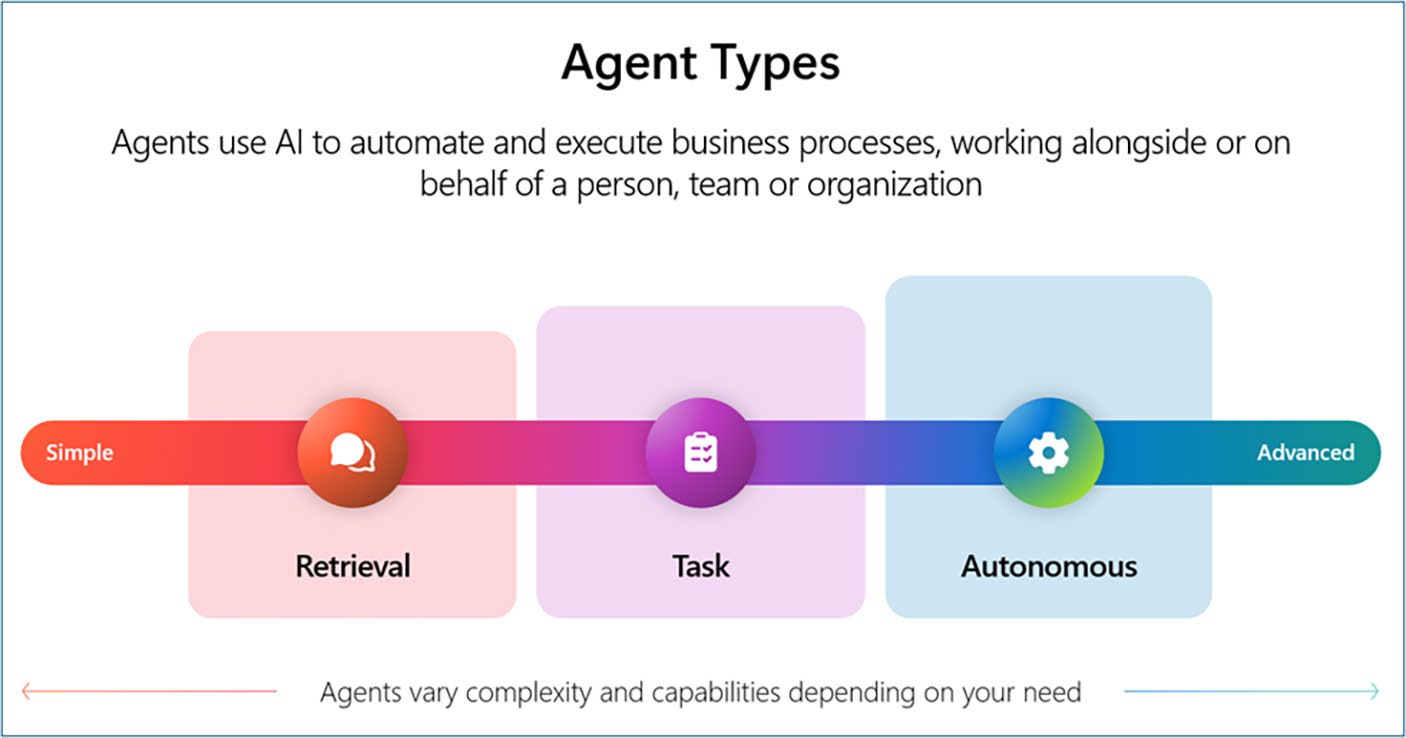
As shown in Figur, Microsoft defines three primary agent types, each increasing in capability, complexity, and governance need called Retrieval Agents, Task Agents, Autonomous Agents.
42
Chapter 5 Copilot agent types and deployment models
Figure 5-1. Primary agent types
Retrieval Agents: Finding and Summarizing
Information
Retrieval agents are the simplest and most common. They don’t
perform actions; they are designed to fetch and surface information from grounded data sources (e.g., SharePoint, OneDrive, CRM systems, Microsoft Graph – files, messages, meeting notes, or chats) based on user queries while respecting user access permissions.
You can create retrieval agents using the following experiences: Copilot Studio Lite in Microsoft 365 Copilot (formerly Agent Builder): Designed for citizen developers, this experience enables quick creation of retrieval agents grounded in SharePoint and tenant Graph content, using a Low-code interface within Microsoft 365.
Copilot Studio: Ideal for makers and developers who want to build agents retrieving data from multiple sources like Graph and third-party services/systems.
43
Chapter 5 Copilot agent types and deployment models SharePoint: SharePoint agents can be created directly inside SharePoint sites or document libraries. These agents are grounded on specific SharePoint content and respect existing site and file-level permissions.
While retrieval agents are generally at lower risk compared to task or autonomous agents, they still require strong governance to prevent unintended data exposure.
Task Agents: Acting with Context and Control
Task agents go a step further. They don’t just summarize – they are designed to automate workflows and perform actions on behalf of users.
Task agents perform tasks such as submitting forms, updating records, sending notifications, or orchestrating business processes across systems.
They are ideal for replacing repetitive, manual tasks and improving operational efficiency.
You can create task agents using
Copilot Studio: Ideal for makers and developers. Copilot Studio provides a Low-code interface to design task agents with Tools to connect with Microsoft 365, Power Platform and third-party services/systems and Workflows to automate multi-step processes.
SharePoint: SharePoint agents are best suited for lightweight, content-driven tasks within SharePoint sites and libraries. These agents do not support external connectors or orchestration.
Task agents introduce moderate governance complexity due to their ability to act on behalf of users and interact with enterprise systems.
44
Chapter 5 Copilot agent types and deployment models Autonomous Agents: Operating on Behalf
of Users
Autonomous agents represent the most advanced category of agents.
Unlike retrieval or task agents, autonomous agents are designed to operate with minimal human input, initiating actions, making decisions, and orchestrating multi-step workflows across systems. These agents act as digital coworkers, capable of managing complex processes end-to-end.
Imagine an agent that monitors an inbox for contract requests, drafts a response, routes it for approval, and schedules follow-up meetings – all automatically. They are ideal for scenarios where speed, consistency, and scale are critical, such as customer service automation, compliance workflows, or operational triage.
You can create autonomous agents using
Copilot Studio: Makers and developers use tools, workflows, and orchestration logic to design agents that interact with multiple systems, including Microsoft Graph, and third-party APIs.
Autonomous agents require the most rigorous governance due to
their complexity and potential impact. Designing them demands robust discipline, including clearly defined boundaries, fallback mechanisms, and human-in-the-loop checkpoints to ensure safe and accountable operation.
Governance Across the Spectrum of Agents
As agents evolve from Retrieval to Task to Autonomous, governance must scale in depth and complexity. Each agent type introduces unique risks and operational behaviors, requiring tailored controls. However, a unified governance framework ensures consistency, compliance, and adaptability across all agent types, including SharePoint agents.
45
Chapter 5 Copilot agent types and deployment models Core Governance Principles for All Agent Types
Regardless of type, all agents must adhere to foundational governance pillars:
Access Control: Agents must only surface or act on
data users are authorized to access. Oversharing at
the data layer (e.g., permissive SharePoint or Teams
permissions) can lead to unintended exposure.
Sensitivity Labels and DLP: Microsoft Purview
sensitivity labels and Data Loss Prevention (DLP)
policies must be enforced. Agents will not process or
surface content that violates these policies.
Audit and Monitoring: Use Microsoft Purview audit
logs to track agent interactions. All agents, including
.agent files in SharePoint, inherit file-level permissions
and life cycle policies. Admins can monitor usage via
Microsoft 365 Admin Center (MAC), Power Platform
Admin Center (PPAC), and SharePoint site statistics.
Environment Isolation: Use managed environments
and environment routing in Power Platform Admin
Center to separate development, testing, and production
agents. This applies to agents built using Copilot Studio.
Agent Inventory and Life Cycle: Maintain visibility
into agent metadata, usage, and ownership. Agents
can be blocked, retired, or reassigned using Microsoft
365 Admin Center (MAC) and Power Platform Admin
Center (PPAC). SharePoint agents behave like files
and follow standard life cycle policies (e.g., retention,
archival, deletion).
46
Chapter 5 Copilot agent types and deployment models Scaling Governance: From Task
to Autonomous Agents
As agents evolve from executing single-step actions to making autonomous decisions, governance must strengthen across five domains: Access, Oversight, Data Protection, Compliance, and Life cycle.
Role-Based Access Control (RBAC): Assign maker
and user roles precisely, restricting environment access
via PPAC. Grant privileges only to approved creators
and maintain separation of duties between makers,
reviewers, and administrators.
Connector and API Governance: Apply DLP policies
to control connector usage (e.g., SQL, Outlook,
SharePoint) and restrict risky write operations. Use
connector classification (Business, Non-Business,
Blocked) to prevent unauthorized data flows.
Telemetry and Alerts: Use Microsoft Sentinel and
Azure Monitor for real-time monitoring and anomaly
detection. Implement alert thresholds for unauthorized
actions, unexpected data access, or behavior drift.
Life Cycle and Deployment Management: Implement
ALM pipelines with approvals, version control, and
safe deployment paths. Include agent attestation
and quarterly reviews to validate ongoing business
relevance and compliance.
Billing and Capacity Planning: Track consumption
and set usage alerts in PPAC. Allocate message
capacity strategically and monitor usage trends for
optimization.
47
Chapter 5 Copilot agent types and deployment models eDiscovery and Compliance: Ensure all agent
interactions are logged and discoverable. Use Purview
for audit, eDiscovery, and communication compliance
to support legal and regulatory requirements.
Insider Risk and Behavioral Monitoring: Detect risky
prompts, unauthorized actions, or data exfiltration
attempts using Purview Insider Risk Management and
Microsoft Defender alerts.
Adaptive Oversight and Human-in-the-Loop: For
autonomous agents, define clear autonomy levels and
fail-safe triggers. Use tiered authorization so higher-
risk operations require human approval.
Identity and Life Cycle Management: Treat
autonomous agents as digital colleagues – assign
unique identities, apply conditional access policies,
and include them in joiner/mover/leaver and life cycle
governance processes.
Continuous Governance and Feedback Loop:
Governance should operate as a living system –
continuously evaluating agent performance,
compliance, and ethical boundaries through Center of
Excellence (CoE) reviews and attestation cycles.
SharePoint Agents: Governed by Content,
Not Code
SharePoint agents are a unique category of Copilot agents created directly within SharePoint sites and document libraries. These agents have no access to external connectors or orchestration – only grounded content 48
Chapter 5 Copilot agent types and deployment models within SharePoint. SharePoint agents are governed as files – meaning their behavior, access, and life cycle are tied to SharePoint’s existing content governance model.
Governance Characteristics of SharePoint agents include
Permission Inheritance: SharePoint agents inherit
permissions from the site or library they reside in.
If a user can access the .agent file, they can invoke
the agent. This makes SharePoint permissions and
sensitivity labels the primary governance mechanism.
Restricted Access Control (RAC): Admins can apply
RAC policies to limit who can view or run agents, even
within shared sites.
Restricted Content Discovery (RCD): RCD ensures
agents don’t surface content from libraries or folders
that users shouldn’t discover – even if they have
indirect access.
Life Cycle Management: Agents are treated like
documents. You can apply retention labels, archive
policies, and deletion schedules using Microsoft
Purview and SharePoint Advanced Management.
Audit and Monitoring: Agent usage is logged via
SharePoint site analytics and Microsoft Purview audit
logs. This includes who invoked the agent, what
content was accessed, and what actions were taken.
While SharePoint agents are simpler to deploy, they still demand disciplined governance. Maintaining good content hygiene is essential –
poorly labeled or overly permissive libraries can result in unintentional oversharing. Every agent should have a clearly defined owner responsible for its scope, maintenance, and compliance posture. Regular attestation 49
Chapter 5 Copilot agent types and deployment models and review cycles should include SharePoint agents to confirm that they remain relevant, secure, and aligned with organizational data governance standards. Consistent oversight ensures that even the simplest agents operate safely within enterprise boundaries while contributing meaningfully to productivity and collaboration.
Agent 365 (Preview) – Centralized Visibility
and Monitoring
Microsoft Agent 365, currently in preview, is the enterprise control plane for managing AI agents across Microsoft 365. It provides a unified dashboard for visibility, governance, and life cycle management of agents built with Copilot Studio (lite and full), custom engine frameworks, and more. Agent 365 delivers observability through telemetry and analytics, supports advanced search and filtering, and enforces security and compliance via identity and access controls. It also offers insights into usage and billing for metered agents, helping organizations optimize resources and maintain compliance.
Agent Life Cycle Management
and Versioning
As agents become embedded in enterprise workflows, managing their life cycle is no longer optional, it’s essential. Governance must extend beyond deployment to include how agents evolve, retire, and remain accountable over time.
50
Chapter 5 Copilot agent types and deployment models Life Cycle Stages
Agents should be treated as digital assets with a defined life cycle: Design and Build: Created in governed environments
with documented purpose and scope.
Test and Validate: Reviewed for reliability, fairness,
and compliance before going live.
Deploy and Monitor: Published to production
environments with telemetry and audit logging
enabled.
Review and Update: Subject to quarterly attestation
cycles to confirm continued relevance and safety.
Retire or Reassign: Decommissioned when obsolete
or reassigned if ownership changes.
Version control is integral to this rhythm. Application Life Cycle Management pipelines, managed through Azure DevOps or GitHub,
ensure consistent rollouts, rollback mechanisms, and regression testing before updates are approved.
Each agent must also have a clearly documented owner. Centralizing ownership metadata – including purpose, data scope, connectors used, and last review date – creating visibility and accountability across the organization.
Life cycle governance thrives on rhythm. Monthly operational reviews surface performance trends and anomalies. Quarterly attestation cycles confirm ownership, relevance, and policy alignment. Annual audits assess compliance and strategic fit, ensuring that the agent portfolio evolves with business and regulatory demands.
51
Chapter 5 Copilot agent types and deployment models As agents become more autonomous, life cycle governance must
mature as well. Instead of static tiering based solely on risk, organizations can adopt a zoned governance approach, adjusting oversight based on operational context, data sensitivity, and level of autonomy. This adaptive model allows governance to scale intelligently – tight where risk is high, flexible where innovation requires freedom.
For a comprehensive framework on implementing zoned governance across Microsoft 365 Copilot and Copilot Studio, refer to Chapter .
Key Takeaways
• Agents operate within user permissions and data
boundaries, and fall into three categories: retrieval,
task, and autonomous – each requiring progressively
stronger governance.
• Governance must scale with agent complexity, using
access controls, sensitivity labels, DLP policies, audit
logs, environment isolation, and agent inventories.
• Life cycle management is critical, with governance
applied from design through retirement using ALM
pipelines, attestation cycles, and ownership metadata.
• Risk classification helps tailor governance strategies,
with agents grouped into zoned governance tiers based
on their capabilities and impact.
52
CHAPTER 6
Tenant Controls,
Permissions, and
Licensing Strategy
Governance Starts at the Tenant Level. Before Copilot can operate effectively, organizations must establish a secure and compliant foundation within their Microsoft 365 tenant. The tenant acts as the control surface, defining how Copilot behaves, who can use it, and what data it can access. This chapter walks through those controls so you can enable Copilot deliberately, not by default.
The Tenant As Your Control Plane
Your Microsoft 365 tenant defines the boundary of trust. Copilot does not create a new identity or bypass your existing security model. It functions entirely within the Microsoft 365 perimeter, governed by Entra ID, Microsoft Graph, and the compliance and data protection policies you have already configured in Purview.
© Suvidha Shashikumar 2026
53
S. Shashikumar, Governance in Microsoft 365 Copilot & Copilot Studio, Apress Pocket Guides
Chapter 6 tenant Controls, permissions, and liCensing strategy
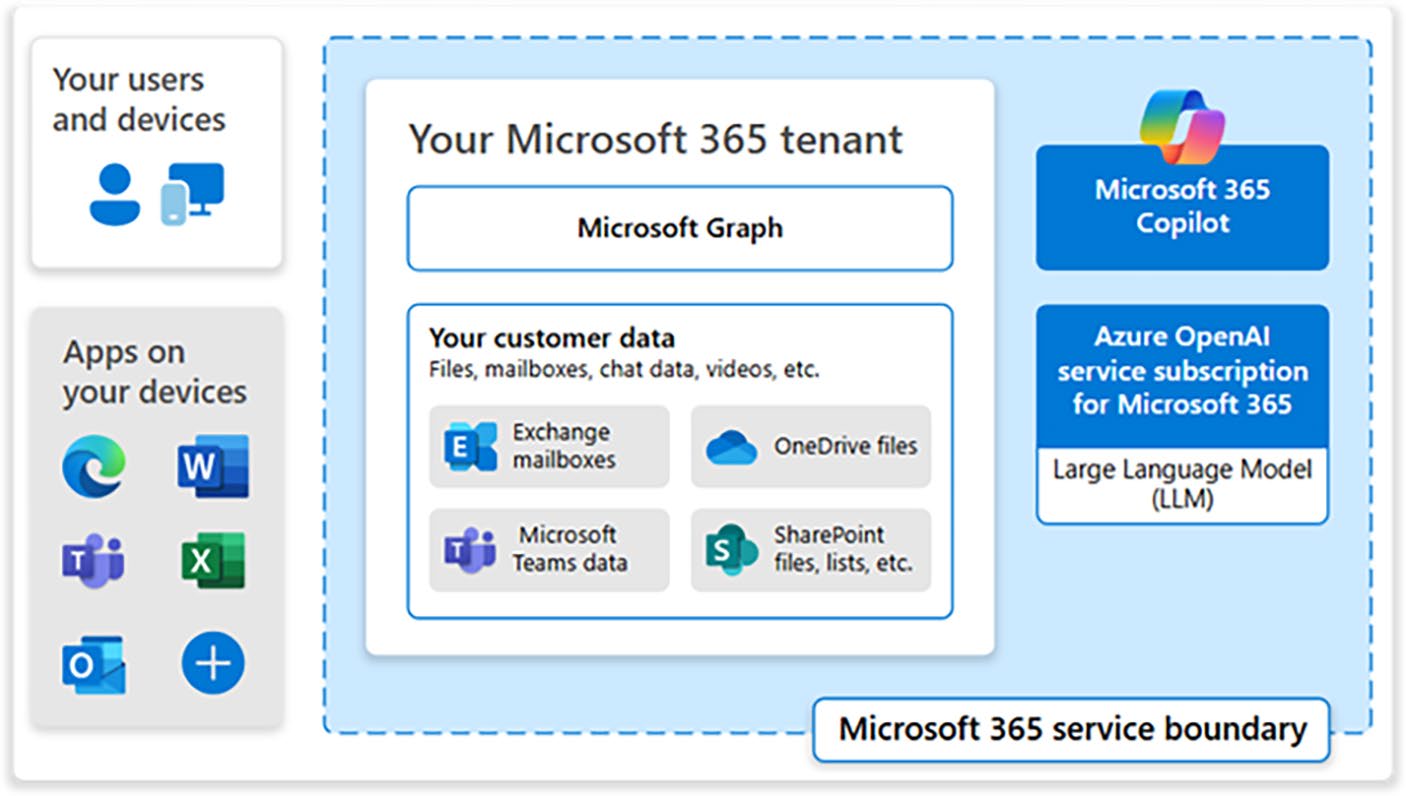
Figure 6-1. Microsoft 365 service boundary
As seen in Figuropilot operates within your Microsoft 365
service boundary.
All requests flow through Microsoft Graph, respecting existing security, compliance, and data-access controls defined in your tenant.
Every Copilot request runs in the context of the signed-in user’s identity, accessing only what that user is already permitted to see. This means your existing Zero Trust practices like verify explicitly, use least privilege, and assume breach – still apply.
Tenant-level governance is about removing assumptions and
reinforcing clarity. Review who has permission to create sites, share content externally, or connect third-party data sources. The fewer unknowns that exist in your tenant configuration, the easier it becomes to predict Copilot’s behavior and maintain consistent control.
54
Chapter 6 tenant Controls, permissions, and liCensing strategy Configuring Tenant-Level Controls
Tenant-level controls determine how far Copilot can reach and how safely it operates. When configured well, tenant controls create a balance between innovation and discipline. They allow users to explore AI capabilities with confidence, knowing that every action still sits within the organization’s security, compliance, and data boundaries.
Start by aligning your configuration with three priorities: secure data access, compliance enforcement, and monitoring readiness. Security defines what Copilot can reach. Compliance determines what it is allowed to process. Monitoring ensures that every interaction remains observable and accountable. Together, these priorities form the control surface for all Copilot activity in your Microsoft 365 tenant.
Central Administration Through the Microsoft
365 Admin Center
The Microsoft 365 Admin Center (MAC) serves as the central point of administration for Copilot and other Microsoft 365 services. From here, administrators can control which workloads – Word, Excel, Teams, PowerPoint, Outlook, Loop, or Whiteboard – are Copilot-enabled, assign licenses, and manage integrated applications.
Each agent or Copilot experience appears in the Integrated Apps section, which now functions as the tenant’s central agent catalog.
Administrators can see every approved, pending, or blocked agent along with its permissions, data access scopes, connector usage, and publisher attestation details. This visibility helps ensure only trusted and compliant agents operate in the tenant, preventing shadow agents or redundant functionality from proliferating.
55
Chapter 6 tenant Controls, permissions, and liCensing strategy This is also where the Copilot Control System (CCS) comes into play. CCS is Microsoft’s unified governance framework for Copilot –
bringing together security and governance, management controls, and measurement and reporting into a single operating model. While Integrated Apps provides the control surface, CCS provides the strategy behind it:
• Security and governance: How Copilot accesses,
processes, and protects organizational data.
• Management controls: Approvals, app/agent life cycle, usage boundaries, and policy enforcement.
• Measurement and reporting: Adoption, usage trends,
productivity insights, and readiness metrics.
MAC surfaces many of these CCS controls directly – letting
administrators track usage, restrict or unblock agents, run controlled pilots, and enforce consistent policies across the tenant. As your Copilot deployment grows, CCS becomes the lens through which you interpret these settings and ensure responsible scaling.
Tenant configuration, when managed deliberately, becomes more
than an IT function – it becomes the governance heartbeat of your Copilot ecosystem, shaping how AI interacts with your people, your processes, and your data.
Identity, Data, and Monitoring Controls
Tenant-level governance begins with identity. Every control, from access permissions to data handling, depends on how securely users authenticate and how consistently those identities are verified. Microsoft Entra ID
provides the foundation for that trust. It defines the authentication, authorization, and device compliance rules that Copilot obeys.
56
Chapter 6 tenant Controls, permissions, and liCensing strategy Multi-factor authentication, conditional access, and session controls ensure that only verified users on managed and compliant devices can interact with organizational data through Copilot. Administrators can further strengthen protection by aligning Entra ID policies with Microsoft Purview sensitivity labels. For example, you can require managed devices for documents labeled “Highly Confidential” or block external sessions from accessing sensitive data. This connection between identity and labeling creates a continuous loop of trust.
Once identity is secured, data protection defines what Copilot can discover and reference. SharePoint Online and OneDrive remain the gatekeepers for content, while Microsoft Purview governs classification, labeling, and protection. SharePoint Advanced Management adds another layer of precision with tools such as Restricted Content Discovery, which hides specific sites or libraries from Copilot indexing, and site-sharing restrictions that prevent oversharing.
Microsoft Purview Information Protection applies sensitivity labels consistently across SharePoint, Teams, and Outlook. These labels automatically inform Copilot’s behavior, ensuring that files marked
“Highly Confidential” are excluded from results while general content remains available. Data Loss Prevention policies reinforce these safeguards by scanning for sensitive information – such as credentials, personal data, or financial details – and blocking access or alerting compliance teams when violations occur. Together, these configurations form the tenant’s data governance backbone.
Monitoring closes the loop. Every Copilot interaction within the tenant is logged in Microsoft Purview Audit, creating a traceable record of who accessed what, when, and through which context. These logs integrate with eDiscovery to support investigations and compliance reviews. For deeper insights, administrators can extend monitoring with Microsoft Sentinel, using its analytics and automation capabilities to correlate 57
Chapter 6 tenant Controls, permissions, and liCensing strategy Copilot activity with broader security events. Sentinel transforms audit data into actionable intelligence, helping you detect anomalies early and verify that governance policies are being followed in real time.
Identity, data, and monitoring controls work best as a single
ecosystem. Identity determines who can act, data protection defines what they can reach, and monitoring confirms that every action stays within policy. When these layers operate in unison, the tenant evolves from a configuration boundary into a living governance framework which is secure, adaptive, and verifiable.
Operational Governance
Tenant controls define the technical perimeter, but governance only succeeds when people actively uphold it. Even the most secure configuration depends on how teams manage access, maintain
permissions, and handle data in daily practice. Operational governance turns technical policy into living behavior – it is what keeps Copilot secure as projects evolve, teams expand, and data boundaries shift.
Operational governance begins with ownership. Every environment, site, and Copilot experience should have a clearly identified steward responsible for its configuration, compliance, and review. The Global Administrator oversees overall enablement and policy settings, while Entra ID administrators manage authentication, multifactor access, and device compliance. Purview administrators handle sensitivity labels, data loss prevention, and life cycle policies. At the content layer, site owners and information stewards control permissions and sharing settings.
Together, these roles create a chain of accountability that connects tenant governance to real-world execution.
Access reviews are the heartbeat of this stewardship model.
Permissions naturally drift over time as roles change and projects close.
Regular reviews confirm that users still need the access they hold and that 58
Chapter 6 tenant Controls, permissions, and liCensing strategy sensitivity labels remain accurate. Microsoft 365 automates much of this process by prompting site owners to validate memberships and content relevance. Workspaces or libraries that remain inactive or unattested can be archived or removed, keeping the tenant lean and reducing exposure.
Purview audit logs extend this discipline by recording every Copilot interaction, giving administrators visibility into how AI is being used across the organization. These records integrate with eDiscovery and Sentinel dashboards, closing the feedback loop between oversight and operational activity.
Finally, governance culture matters as much as configuration. The principle of least privilege should shape every access decision. Users should have only what they need and only for as long as it serves a legitimate purpose. When this mindset becomes part of onboarding, reviews, and leadership communication, governance stops being a periodic task and becomes a shared value.
Operational governance and stewardship ensure that your technical controls are not static settings but living commitments. They make compliance continuous, access intentional, and Copilot trustworthy by design.
Licensing Strategy and Cost Management
Licensing is both a control and a commitment. Assigning Copilot access defines who can use the technology, how costs accumulate, and how data governance policies apply. A clear licensing strategy allows administrators to balance innovation with accountability, ensuring that Copilot is introduced where it delivers measurable value.
Licenses should never be treated as an entitlement. Each one
represents an operational boundary that connects an identity, a compliance policy, and a budget line. Assigning licenses intentionally reinforces both security and fiscal discipline while supporting the 59
Chapter 6 tenant Controls, permissions, and liCensing strategy organization’s AI adoption journey. When licensing aligns with identity governance, cost management becomes a natural extension of security and compliance.
Licensing Models and Consumption Strategy
Microsoft 365 Copilot can be licensed through either per-user or consumption-based models, depending on organizational maturity and scale.
Most enterprises begin with per-user licensing, typically tied to Microsoft 365 E3 or E5 subscriptions (make sure to check Microsoft licensing guide for up-to-date information). This approach provides predictable costs and allows administrators to define exactly who has access to Copilot experiences.
When planning distribution, start small. Introduce Copilot to
controlled pilot groups such as productivity champions, power users, or departments with well-defined use cases. Gather adoption feedback, evaluate productivity gains, and refine governance controls before expanding across the organization. This deliberate rollout validates configuration, mitigates risk, and builds internal confidence.
For flexible or short-term scenarios, administrators can choose a pay-as-you-go model for Copilot Chat or agent-based experiences.
Consumption licensing tracks actual usage rather than fixed seats, making it ideal for proofs of concept, seasonal workloads, or projects that require limited access. It supports experimentation without long-term cost commitments while still respecting identity and compliance boundaries.
Regardless of the model, licensing must align with governance.
Licenses should map directly to active identities in Entra ID, and deprovisioned users must automatically lose Copilot access.
Administrators should regularly review usage reports and spending trends within the Microsoft 365 or Power Platform Admin Center to ensure that financial and operational governance remain synchronized.
60
Chapter 6 tenant Controls, permissions, and liCensing strategy Licensing decisions should remain in sync with Conditional Access and identity policies defined at the tenant level, ensuring that only verified users on trusted devices can use their assigned Copilot privileges.
Licensing is not a billing exercise – it is a control point that defines who can interact with AI in the enterprise and under what circumstances.
Tracking Utilization and Avoiding Sprawl
Once licenses are assigned, administrators must ensure that Copilot access is being used effectively and that inactive allocations are reclaimed.
Tracking utilization is essential to maintaining both financial efficiency and operational control.
The Microsoft 365 Admin Center provides detailed analytics, including usage trends, adoption reports, and per-user activity summaries. These insights help you identify where Copilot is delivering measurable value and where licenses may be underused. Regular reviews prevent silent sprawl – situations where licenses remain active but contribute little to productivity or insight.
Conduct periodic audits to identify accounts with minimal or no activity. Reclaiming or reassigning those licenses not only reduces unnecessary cost but also sharpens visibility into who is actively engaging with AI tools. Integrating license data with Purview Audit or Microsoft Sentinel dashboards can further enhance visibility, allowing you to correlate usage metrics with compliance posture and security signals.
Effective utilization tracking turns licensing into a dynamic governance tool. It ensures that every license serves a purpose, every cost supports value, and every Copilot instance operates within a monitored, intentional framework. The goal is not to maximize license counts but to optimize them for meaningful use across the enterprise.
61
Chapter 6 tenant Controls, permissions, and liCensing strategy Key Takeaways
• Governance begins at the tenant: Your Microsoft 365
tenant defines Copilot’s trust boundary. Every request
runs in the user’s identity context, inheriting existing
security, compliance, and access controls.
• The Microsoft 365 Admin Center is the control hub:
Use it to manage Copilot settings, integrated apps,
and usage analytics. Centralized control ensures
only approved agents and workloads operate within
the tenant.
• Identity and Conditional Access enforce trust: Entra ID policies, multi-factor authentication, and session
controls determine who can use Copilot and under
what conditions. Align these rules with data sensitivity
to maintain a closed loop of trust.
• Data protection depends on consistent labeling:
Sensitivity labels, Data Loss Prevention (DLP), and
SharePoint Advanced Management keep Copilot
grounded in secure and compliant content. What a user
cannot open, Copilot cannot reveal.
• Governance is sustained by people: Clear roles for
Global, Entra ID, and Purview administrators – along
with regular access reviews – turn security policy into
daily practice.
• Licensing is part of governance, not just
procurement: Assign licenses deliberately, monitor
usage, and reclaim inactive allocations to balance
innovation with fiscal discipline.
62
CHAPTER 7
Data Protection and
Life Cycle Governance
As Copilot becomes woven into everyday work, governance must shift from configuration to care. Security defines who can access data, but data protection defines how that data behaves once accessed. Life cycle governance, meanwhile, ensures that agents remain accurate, compliant, and valuable as they evolve over time. Together, these disciplines protect not only information but also trust – the core currency of intelligent systems.
Data Classification and Sensitivity Labels
Data protection begins with clarity. You cannot protect what you have not defined.
Use Microsoft Purview Information Protection (MIP) within the Purview Compliance Portal to classify and label data according to its sensitivity as public, internal, confidential, or highly confidential. Copilot automatically honors these labels, showing only what a user’s permissions and data classification allow.
For example, a document labeled Highly Confidential – Financial will never appear in Copilot results for a marketing user, even if that user has access to the containing SharePoint site.
© Suvidha Shashikumar 2026
63
S. Shashikumar, Governance in Microsoft 365 Copilot & Copilot Studio, Apress Pocket Guides
Chapter 7 Data proteCtion anD Life CyCLe GovernanCe Apply labeling consistently across SharePoint, Teams, Outlook, and OneDrive. Each label should trigger appropriate protective action, such as encryption, watermarking, or access restriction. The goal is to make protection inherent to the content itself, not reliant on user behavior.
Labels also support life cycle governance. By tagging information with retention or deletion policies, you ensure that Copilot draws from accurate, current, and purposeful data sources rather than outdated repositories that could surface irrelevant or risky content.
AI-generated content now follows the same retention, deletion, and storage rules as any other file in Microsoft 365. Copilot-created documents, summaries, emails, and agent outputs are stored in the user’s OneDrive, SharePoint, or Teams location and inherit the sensitivity label, retention policy, and DLP rules applied to that container. This ensures AI output doesn’t create a parallel shadow repository and stays inside your existing information governance boundaries.
Oversharing and Data Residency Controls
Oversharing is one of the most common causes of AI risk. Copilot cannot access data it is not permitted to see, but overly permissive sharing within SharePoint or Teams can quietly expand that boundary.
SharePoint Advanced Management (SAM) helps administrators hide sensitive libraries from Copilot indexing through Restricted Content Discovery and restrict link-sharing or download capabilities.
In global organizations, Purview Data Loss Prevention (DLP) and Data Location Dashboards ensure compliance with geographic regulations such as GDPR or HIPAA. For Example, a DLP rule can block Copilot from referencing EU-stored payroll files in a US-based chat.
64
Chapter 7 Data proteCtion anD Life CyCLe GovernanCe Monitoring, Attestation, and Continuous
Improvement
Once Copilot and agents are live, governance becomes a rhythm of observation, validation, and refinement.
Use Purview Audit (Premium) to track who accessed what and when. Visualize usage and anomaly trends in Power BI, such as which agents generate the most output or when access spikes occur outside business hours.
Integrate these insights with Microsoft Sentinel to correlate AI events with broader security signals – for example, sign-ins from risky locations, Defender alerts about data exfiltration attempts, or sudden permission escalations in Entra ID. Seeing these together helps detect whether an AI-driven action coincides with a potential compromise.
Microsoft Purview now includes Data Security Posture Management (DSPM) for AI, which acts as your central dashboard for AI-related data risk: it surfaces where Copilot touches sensitive data and highlights oversharing patterns or high-risk sites. DSPM becomes your AI-focused risk view, helping you validate that your data governance policies are working as intended.
Each monitoring cycle should confirm ownership and purpose.
Every active agent must have a documented steward and renewal date.
Power Automate can simplify this by sending quarterly reminders for owners to attest that their agent remains current and compliant.
Inactive or unverified agents can be automatically flagged for review or decommissioning.
Continuous improvement closes the loop. Findings from audit and attestation feed directly into policy updates – tightening DLP rules, refining sensitivity labels, or adjusting environment boundaries. When these reviews happen on schedule, governance becomes self-sustaining: a living system that learns from its own data.
65
Chapter 7 Data proteCtion anD Life CyCLe GovernanCe Key Takeaways
• Label with intention: Purview Information Protection enforces boundaries automatically.
• Prevent oversharing: SAM and DLP keep data scoped
and regionally compliant.
• Correlate activity: Sentinel and Defender signals
expose unusual AI or identity behavior.
• Automate reviews: Power Automate reminds owners
to re-attest and retire inactive agents.
• Evolve continuously: Monitoring and feedback make
governance adaptive and resilient.
66
CHAPTER 8
Copilot Studio
Governance
Essentials
Governance does not stop at Microsoft 365. Copilot Studio opens the door for makers and developers to create custom agents that reach beyond traditional boundaries. These agents can connect to external data, call APIs, and automate complex workflows. Without clear guardrails, a well-meaning maker can expose data or deploy logic that behaves unpredictably.
Copilot Studio governance ensures that experimentation remains safe, scalable, and compliant. It builds on your tenant controls but adds deeper oversight for environments, connectors, and agent behavior.
Environment Strategy and Isolation
In Copilot Studio, every agent lives inside a Power Platform environment – a logical and secure space where you store, manage, and share your organization’s business data, apps, and agents.
Development environments are used for experimentation with sample or anonymized data. Sandbox/Test environments are used to validate agents and collect feedback before release. Production environments host
© Suvidha Shashikumar 2026
69
S. Shashikumar, Governance in Microsoft 365 Copilot & Copilot Studio, Apress Pocket Guides
Chapter 8 Copilot Studio GovernanCe eSSentialS
only approved agents that work with live business data and real users. This separation keeps innovation flexible while protecting operational stability.
Transitions between these stages should follow a structured
Application Lifecycle Management (ALM) process, using Power Platform Pipelines, Azure DevOps, or GitHub Actions to move solutions safely through Dev ➤ Test ➤ Prod.
Environment-Level Governance Settings
Before creating agents, administrators should configure environment-level AI controls in Power Platform Admin Center (PPAC), such as toggling Generative AI Orchestration and controlling Bing Search integration.
Applying these settings consistently across Dev, Test, and Prod environments enforces compliance and prevents unintended exposure of sensitive data.
Knowledge Source Restrictions
You’ll want to define which knowledge sources your agents can access.
This is where most accidental governance gaps come from. In PPAC, use Data Loss Prevention (DLP) policies to block sensitive sites or libraries in SharePoint and OneDrive. Block public websites and external documents to prevent agents from pulling data from uncontrolled sources.
Publishing Controls
Copilot Studio supports admin-enforced publishing controls that ensure agents cannot bypass your environment strategy. Administrators can require routing through Dev ➤ Test ➤ Prod, restrict makers from publishing directly into production, or mandate approval before an agent can be shared broadly. These controls prevent accidental deployment of untested agents and ensure all solutions follow your zoning and ALM
standards.
Maker Onboarding and Compliance Messaging
To reinforce responsible usage, configure maker onboarding experiences in Power Platform Admin Center (PPAC). Use welcome banners and compliance reminders to highlight organizational policies, data handling 70
Chapter 8 Copilot Studio GovernanCe eSSentialS
rules, and security requirements. These messages should appear when makers access environments or create agents, ensuring awareness of governance standards from the start.
A Managed Environment is a Power Platform capability that adds an extra layer of governance and insight to any environment. It helps administrators manage growth, monitor activity, and enforce consistent practices across makers. In the Power Platform Admin Center, Managed Environments enable you to view usage and sharing analytics at the environment level, limit sharing and enforce solution-based development, gain visibility into capacity, connector usage, DLP compliance, and so on.
When regulatory or contractual requirements demand data residency, create environments in specific geographic regions (e.g., EU or the USA) and restrict agents to connect to data hosted in those same regions.
Each environment should have an assigned owner and life cycle plan.
The governance team or Center of Excellence (CoE) should periodically review environment activity to confirm that it still serves an active business purpose. Inactive or redundant environments should be archived or deleted to control cost and complexity.
Use Power Automate or Power Platform Pipelines to automate review notifications and decommissioning workflows. This keeps the platform lean while maintaining accountability.
Access Control and Role Design
Strong access control keeps governance practical. It defines who can create agents, what data they can use, and how far those agents can reach.
In Copilot Studio, permissions are enforced through a combination of Microsoft Entra ID, Power Platform role-based access control (RBAC), and Data Loss Prevention (DLP) policies.
71
Chapter 8 Copilot Studio GovernanCe eSSentialS
User Identity, Licensing, and Role-Based Access
Identity is where all Copilot Studio governance begins. Every action a maker takes – creating an agent, updating logic, publishing a version, and so on – runs under their Entra ID account. That means the same controls that protect Microsoft 365 apply here automatically. When you enforce MFA, conditional access, or compliant device requirements, you’re also protecting how agents are created and used. Nothing changes; the guardrails simply extend into Copilot Studio.
Agents as identities: Microsoft is evolving agents to function as first-class identities in Entra ID, similar to service principals. When this matures, you’ll be able to assign permissions directly to agents, track their usage, and even apply life cycle policies to them. In practical terms, this will make least-privilege enforcement far easier because you’re no longer guessing what an agent “might” be able to touch – you’ll see it clearly.
Licensing: A maker can only build agents if they’re licensed to do so. If you assign someone a Copilot Studio authoring license, you’re giving them a seat at the table – they can open Copilot Studio, build agents, and publish updates. If they don’t have a license, they can still use agents, but they can’t create or modify them.
You’ll want to regularly audit these assignments in the Microsoft 365
Admin Center or Power Platform Admin Center. As people move teams and change their roles, a license that made sense last quarter may not make sense now.
Roles: Administrators should assign roles and permissions deliberately in Power Platform Admin Center, limiting who can create, edit, or publish agents. Some key roles include
• Environment Admins manage security,
DLP, connector policies, and capacity at the
environment level.
72
Chapter 8 Copilot Studio GovernanCe eSSentialS
• Makers (Environment Maker) can create agents, apps,
flows, and related assets within an environment.
• Users interact with finished agents through approved channels.
External or guest users cannot create or publish agents in Copilot Studio. They can only interact with agents that have been shared with them, provided sharing policies allow it.
Administrators should review guest access settings in Microsoft Entra ID and Power Platform Admin Center, Ensure DLP and environment policies apply consistently to guests and avoid granting elevated roles (such as Environment Maker) to external accounts.
Copilot Studio does not provide a global toggle to disable agent creation. Governance is enforced through Data Loss Prevention (DLP) policies to block risky connectors and data flows, Role-based permissions in Power Platform Admin Center to limit who can create or publish agents and Environment routing and isolation to ensure agents follow Dev ➤ Test
➤ Prod paths.
Data Loss Prevention (DLP) and Connector
Governance
Data Loss Prevention (DLP) policies define how data can move across connectors in the Power Platform and Copilot Studio. These policies are the backbone of connector governance, ensuring that copilots and agents never combine data from trusted internal systems with untrusted or public services.
73
Chapter 8 Copilot Studio GovernanCe eSSentialS
Administrators can configure DLP policies in the Power Platform Admin Center, where connectors are grouped into categories:
• Business connectors: Internal and trusted systems
such as Dataverse, SharePoint, Outlook, or Teams
• Non-business connectors: Public or external services like Twitter, Gmail, or Dropbox
• Blocked: Systems or services you want to block
completely under any circumstances
Copilot Studio automatically enforces these groupings. For example, if Dataverse connector is in the Business group and Dropbox connector is in Non-business, a maker cannot build an agent that copies company data to Dropbox.
You should use tenant-level DLP policies for organization-wide rules and environment-level policies for more granular control. Tenant-level policies might restrict all agents from using social media connectors, while environment-level ones can allow specific connectors for approved pilot programs.
For additional precision, you can use connector endpoint filtering to restrict connections to specific domains or API endpoints.
Microsoft now supports scoped connector controls, allowing
administrators to restrict connectors to approved domains, APIs, or specific data sources. This gives far more granular governance over what agents can access – preventing unintended data movement even when a connector itself is allowed by DLP.
Review DLP configurations quarterly to align them with evolving data policies and new connectors added by Microsoft or third parties. Out-of-date DLP settings are one of the most common causes of accidental data exposure.
74
Chapter 8 Copilot Studio GovernanCe eSSentialS
Agent-Level Governance
Once environments, access controls and connector policies are in place, governance must extend to the agents themselves. Every agent built in Copilot Studio is a digital asset that can access data, execute actions, and influence business outcomes. Without oversight, even well-intentioned agents can introduce risk – connecting to unapproved data, exposing sensitive information, or producing inconsistent results.
Ownership and Accountability
Each agent should have a clearly identified owner responsible for its purpose, data connections, and ongoing maintenance. Ownership
establishes accountability – it defines who updates the agent, who reviews its performance, and who responds if issues arise.
Document ownership and contact details centrally in a governance registry or dashboard, ideally maintained by the governance lead or CoE.
When an agent owner leaves the organization, reassign ownership immediately to avoid orphaned copilots running unattended.
Governance teams can use Power Automate or Power Platform
Pipelines to trigger review workflows when ownership changes or inactivity thresholds are met.
Testing and Quality Assurance is super-important. Testing ensures that agents behave reliably before they reach users. Each new or updated agent should go through a controlled validation process in a test or UAT environment, where reviewers can evaluate accuracy, tone, and compliance with data boundaries.
For example, a customer support copilot trained on product manuals should not produce responses that contradict the official documentation or reveal internal notes.
75
Chapter 8 Copilot Studio GovernanCe eSSentialS
Testing should verify that
• The agent retrieves only intended data.
• Responses remain accurate and aligned with approved
content.
• Sensitive data is not exposed in prompts or outputs.
Automated validation can be integrated into ALM pipelines using Power Platform Pipelines or Azure DevOps, ensuring agents cannot move to production until tests pass.
Agent Monitoring and Behavior Review
Once an agent goes live, governance shifts from configuration to observation. This is where you see how your agents behave in the real world – how they respond to users, what data they touch, and whether they drift from their intended purpose. I’ve learned that a lot of governance issues don’t show up during development; they surface only after users start interacting with an agent at scale.
You’ll rely on three main sources for this visibility – Copilot Studio Analytics, Power Platform Admin Center telemetry, Microsoft Purview audit logs. Together, they give you a full picture of what the agent is doing, how often it’s used, and whether it’s staying inside the guardrails you defined earlier.
Governance teams should review this telemetry during operational reviews, looking for sudden spikes in activity or data access, failed conversations or repeated user complaints and high API call volumes or unexpected connector usage.
When monitoring reveals issues, document the corrective action taken such as refining prompts, tightening DLP policies, or retraining the agent with approved data.
76
Chapter 8 Copilot Studio GovernanCe eSSentialS
This feedback loop ensures agents stay aligned with both user
expectations and governance policy.
Change Control and Versioning
Agents aren’t static. They evolve as your business evolves – new data sources, improved prompts, updated logic, and refined behaviors. Because of that, you need a clean and predictable way to track every change.
Without versioning, even a small update can introduce unintended behavior, and you won’t know what changed or how to roll it back.
Use ALM pipelines or source control (Azure DevOps or GitHub)
as your single source of truth. When you package agent updates inside solutions, every version becomes traceable. You can see who made changes, when they made them, and what was modified.
Versioning also gives you practical safety. If a new release breaks a workflow, surfaces incorrect information, or violates a data policy, you can instantly roll back to a stable version. It’s one of the simplest forms of risk mitigation, and also one of the most effective.
Human Oversight with Agents
Even the best-governed agents require human judgment. Some agents touch sensitive data, trigger high-impact workflows, or generate content that represents your organization. In those moments, you don’t want a fully autonomous agent making decisions on its own.
Your governance model should preserve a “human-in-the-loop” step for any agent that carries risk – especially those that automate decisions or send external communications. Human oversight isn’t about slowing things down; it’s about adding a final layer of review where it actually matters. Sometimes that means approving an action, validating a response, or reviewing outputs before they reach users or customers.
77
Chapter 8 Copilot Studio GovernanCe eSSentialS
Build this into your governance rhythm. Decide which agents need human approval, define the reviewers, and make sure the process is simple enough that people actually follow it. Human-in-the-loop is how you blend speed with responsibility. It keeps agents aligned with your standards while still delivering the efficiency gains you built them for.
Application Lifecycle Management (ALM)
of Agents
Copilot Studio makes it incredibly easy to build agents fast, but speed without structure creates long-term risk. ALM gives you the discipline to move every agent through a consistent path: designed, tested, approved, deployed, and reviewed. When you treat agents like any other enterprise solution, you protect yourself from accidental breakage and unintentional behavior.
ALM provides the framework that carries an agent safely from idea to production. It ensures that every version is tested, approved, and traceable, and that nothing reaches users without passing through the right checks.
ALM Tools and Pipelines
Copilot Studio agents are packaged and moved using Power Platform solutions, so they can move through the same ALM tools that support Power Apps applications and Power Automate flows.
Common options include
• Power Platform Pipelines: The simplest way to
automate deployment between Development, Test, and
Production environments directly within the Power
Platform Admin Center
78
Chapter 8 Copilot Studio GovernanCe eSSentialS
• Azure DevOps Pipelines: For organizations that need
custom automation, validation, or integration with
broader DevOps workflows
• GitHub Actions: Lightweight automation for source
control and deployment in cloud-native teams
All these tools support consistent packaging, testing, and deployment while maintaining change history and governance sign-offs.
Versioning, Testing, and Approval Gates
Every agent version should go through controlled stages before anyone uses it. Power Platform Pipelines usually define these as deployment stages with manual or automated approval gates. Approvers, often governance leads or environment admins, verify that DLP policies are correct, testing has passed in a non-production environment, and the agent’s ownership, metadata, and documentation are complete.
You can also embed automated compliance checks here so that an agent is validated against security and data policies before deployment.
Once the approver signs off, the pipeline promotes the agent to the next stage. This gives you a clean digital paper trail and ensures that only validated agents ever reach production.
Versioning inside Power Platform Pipelines, Azure DevOps, or
GitHub also allows you to restore previous builds quickly. If a new release introduces performance issues, compliance problems, or breaks something important, rollback becomes a simple and safe option. This remains one of the most effective ways to reduce operational risk in agent governance.
79
Chapter 8 Copilot Studio GovernanCe eSSentialS
Monitoring and Analytics
Once agents are live, visibility must extend beyond data protection to how each agent behaves, performs, and evolves. This form of monitoring focuses on usage, performance, quality, and accountability – ensuring copilots continue to operate responsibly long after deployment.
Built-In Copilot Studio Analytics
Copilot Studio includes native analytics that provide insights into how agents are used in real scenarios. Agent owners and Administrators can view metrics such as conversation volume, active users, satisfaction scores, and topic engagement. These reports reveal how well an agent serves its intended purpose.
For example, if a helpdesk agent handles most inquiries but triggers frequent escalation, analytics can point to knowledge gaps that need retraining or redesign.
This type of monitoring differs from tenant-level oversight because it measures agent effectiveness, not data access.
Telemetry via Power Platform Admin Center
and Purview Audit
The Power Platform Admin Center provides operational telemetry at the environment level, showing which agents are most active, which connectors they use, and how makers are updating them.
Microsoft Purview Audit extends this traceability to individual interactions, recording when agents are accessed, what data they reference, and whether any exceptions occur.
Together, these insights allow governance teams to connect agent behavior to policy enforcement.
80
Chapter 8 Copilot Studio GovernanCe eSSentialS
For instance, if a marketing agent begins using connectors outside approved policies, Purview audit logs will surface that deviation for immediate review.
Visualization and Reporting with Power BI
Power BI can consolidate Copilot Studio analytics, audit data, and environment telemetry into unified dashboards that focus on agent performance and impact.
These dashboards can show which agents deliver measurable
business outcomes, which are underused, and where optimization opportunities exist.
For example, a dashboard may highlight that 70% of support queries are now resolved by agents, providing a tangible measure of ROI and reliability.
Unlike enterprise compliance reporting, this level of analytics helps teams evaluate how well agents serve people and processes, not just whether they stay compliant.
Integration with Microsoft Sentinel
for Security Signals
When agents operate at enterprise scale, integrating their telemetry with Microsoft Sentinel provides security-context awareness. Sentinel can correlate agent activity with broader signals such as identity risk, data movement, or unusual login patterns. This allows security teams to detect misuse or compromised connectors early. For example, a sudden increase in API calls or off-hours activity may indicate misconfiguration or automation loops that require intervention.
81
Chapter 8 Copilot Studio GovernanCe eSSentialS
Continuous Feedback and Governance
Improvement
Monitoring is most valuable when it drives action. The insights collected from Copilot Studio analytics, audit logs, and Power BI dashboards should feed directly into your governance rhythm – helping teams refine rules, retrain copilots, and evolve policies based on real usage. Governance councils or Center of Excellence (CoE) teams can use this feedback to identify what works and what needs adjustment.
For example, telemetry showing low engagement might prompt
simplification of prompts or consolidation of redundant agents, while consistently high usage may justify scaling an agent to new departments.
This continuous improvement loop transforms governance from a
static compliance exercise into an adaptive system that learns alongside your organization.
Measuring What Matters: Governance Metrics
and Reporting
Monitoring provides visibility, but governance requires measurable outcomes. Define clear KPIs and reporting mechanisms to track
compliance, operational performance, and adoption. These metrics turn raw telemetry into actionable insights for leadership and governance councils, reinforcing the Responsible AI principles of reliability and accountability by ensuring agents remain trustworthy and aligned with organizational standards.
Compliance indicators demonstrate whether agents adhere to organizational policies and regulatory requirements. Examples include the percentage of agents reviewed within a governance cycle, the number of policy violations detected and resolved, and audit readiness scores based on Purview checks. These measures confirm that governance is not just theoretical but actively enforced.
82
Chapter 8 Copilot Studio GovernanCe eSSentialS
Operational performance metrics focus on resilience and reliability.
Tracking agent uptime and availability against disaster recovery objectives, monitoring mean time to recovery during incidents, and analyzing the frequency and resolution of alerts provide insight into how well the system responds under stress. These measures ensure that governance supports continuity and user trust.
Adoption and value metrics reveal whether agents deliver meaningful impact. Conversation volume, user satisfaction scores, and ratios of active to inactive agents highlight engagement. ROI indicators, such as the percentage of support queries resolved by agents, connect governance to tangible business outcomes.
Reporting should consolidate these insights into accessible formats.
Power BI dashboards can unify Copilot Studio analytics, Purview audit logs, and environment telemetry into a single view. Governance scorecards provide leadership with a concise summary during monthly or quarterly reviews, while automated alerts in Power Platform Admin Center and Microsoft Sentinel ensure real-time visibility into compliance and risk signals.
Finally, governance should operate on a predictable rhythm. Monthly operational reviews, quarterly compliance audits, and annual maturity assessments create a cycle of continuous improvement. This cadence transforms governance from a static checklist into a dynamic system that evolves with organizational needs.
By combining monitoring with measurable outcomes, governance
shifts from passive oversight to active accountability – ensuring agents remain reliable, secure, and aligned with organizational goals.
83
Chapter 8 Copilot Studio GovernanCe eSSentialS
Disaster Recovery and Availability
Business continuity is critical for Copilot Studio agents. Governance must ensure that services remain available during outages and can recover quickly without data loss or compliance breaches.
• Failover Strategy: Implement geo-redundancy and
backup environments for critical workloads. Use Azure
Site Recovery or equivalent for high availability.
• Recovery Objectives: Define Recovery Time Objective
(RTO) and Recovery Point Objective (RPO) for agent
restoration and data recovery.
• Backup and Restore Procedures: Document steps for
restoring agent configurations, connectors, and ALM
versions. Include automated rollback capabilities in
pipelines.
• Testing and Validation: Conduct periodic DR drills
and maintain audit logs of results. Update plans based
on lessons learned.
• Monitoring and Alerts: Integrate telemetry and
anomaly detection with Microsoft Sentinel. Configure
automated alerts for downtime events and recovery
progress.
• Compliance: Ensure DR plans meet regulatory
requirements (GDPR, HIPAA) and maintain audit
readiness.
• Roles and Responsibilities: Define escalation
paths and RACI mapping for DR activities to ensure
accountability during incidents.
84
Chapter 8 Copilot Studio GovernanCe eSSentialS
Cost Controls and Consumption
Management
Managing cost is a critical part of governance for Copilot Studio. While administrators often ask about hard spend limits, Copilot Studio does not support maximum spend caps. Instead, governance relies on proactive monitoring and alerts.
• Consumption Alerts: Configure alerts for prepaid
message packs and pay-as-you-go billing thresholds
in Power Platform Admin Center and Azure Cost
Management.
• Usage Reporting: Review usage analytics regularly to identify spikes in consumption.
• License Reviews: Audit license assignments to prevent uncontrolled growth.
• Budget Forecasting: Use historical consumption
data to predict future costs and allocate budgets
accordingly.
Important Note there is no feature to enforce hard spend limits.
administrators must rely on alerts and monitoring to manage costs effectively.
Beyond monitoring and forecasting, organizations should define how Copilot Studio costs are allocated internally. Use Power Platform Admin Center analytics and Azure Cost Management reports to track consumption by environment or department. Implement internal
85
Chapter 8 Copilot Studio GovernanCe eSSentialS
chargeback or showback models to distribute costs fairly and encourage responsible usage. This approach promotes transparency and helps business units plan budgets effectively.
Community and Training Strategy
Governance is only effective when makers and stakeholders understand and embrace it. Establish a structured adoption plan that includes role-based training for makers, admins, and business users. Go beyond formal training by creating a vibrant community:
• Organize internal showcases, hackathons, and
champion programs to promote best practices and
innovation within guardrails.
• Use dedicated channels (Teams, Yammer, or internal
portals) to share updates, compliance tips, and success
stories.
• Encourage peer learning and recognition to build a
culture of responsible AI development.
A strong community and training strategy ensures makers feel
supported, compliance becomes second nature, and innovation thrives without compromising governance.
Key Takeaways
• Every agent is a governed digital asset that must
operate within defined environments and access
boundaries.
86
Chapter 8 Copilot Studio GovernanCe eSSentialS
• A clear environment strategy supported by ALM
pipelines and Managed Environments, keeps
experimentation and production safely separated.
• Licensing and role assignments work together to define
who can create, manage, and use agents; both must
align for secure governance.
• Data Loss Prevention (DLP) policies and connector
governance prevent sensitive information from
crossing trust boundaries.
• Ownership and accountability ensure each agent has a
responsible steward throughout its life cycle.
• Versioning, approval gates, and rollback plans bring
discipline and traceability to every update.
• Agent-level monitoring focuses on performance,
adoption, and compliance, transforming analytics into
actionable governance insights.
• Continuous feedback turns governance into a living
system that evolves with real usage and organizational
maturity.
87
CHAPTER 9
Scaling Governance –
Zoned Model and
Center of Excellence
As your agents start proving their value, adoption accelerates fast. Teams start building their own agents, departments ask for AI automation, and use cases pop up everywhere. I’ve seen this pattern in every organization that crosses the first threshold of AI maturity.
But here’s the reality:
If you don’t set up structure early, adoption grows in ways that create duplication, inconsistent quality, and unmanaged risk.
Scaling governance is how you let innovation stay fast without creating chaos. At scale, governance stops being “policies and controls”
and becomes an operating model – something people follow instinctively because it makes work easier, not harder.
Two frameworks help you get there:
• The Three-Zone Governance Model: Keeps
experimentation and production from stepping on
each other
• The Center of Excellence (CoE): The engine that
makes governance real across people, processes, and
platforms
© Suvidha Shashikumar 2026
89
S. Shashikumar, Governance in Microsoft 365 Copilot & Copilot Studio, Apress Pocket Guides
Chapter 9 SCaling governanCe – Zoned Model and Center of exCellenCe Together, they give you a system that lets hundreds of agents thrive safely, efficiently, and in alignment with your strategy.
The Three Governance Zones
The Three-Zone Governance Model classifies agents and environments based on risk, data sensitivity, and maturity. Each zone applies a level of control proportionate to its purpose – ensuring that experimentation and production can coexist without conflict.
Innovation Zone: This is a safe space where
makers and developers can explore ideas and
build prototypes without worrying about breaking
anything. Guardrails such as Data Loss Prevention
(DLP) policies and connector restrictions
prevent access to sensitive data, while optional
Managed Environments provide visibility and
monitoring to avoid sprawl. The goal is to enable
rapid learning and innovation while minimizing
organizational risk.
Controlled Zone: Here’s where an idea starts
becoming a reliable business tool. Governance
becomes more structured with approvals for
new connectors and environment changes, and
Application Lifecycle Management (ALM) pipelines
enforce solution movement across development,
test, and production environments. Documentation,
metadata, and clear ownership are required for
every solution, giving teams confidence in reliability
without sacrificing agility.
90
Chapter 9 SCaling governanCe – Zoned Model and Center of exCellenCe Restricted Zone: This zone handles your high-sensitivity or regulated workloads like finance, HR,
legal, healthcare, or anything that requires strict
oversight. Only approved makers can build here.
Compliance is maintained through continuous
audit logging with Microsoft Purview and advanced
monitoring with Microsoft Sentinel. Strict DLP
policies, conditional access, and versioning for
every change ensures end-to-end security and
compliance.
Admin-enforced publishing approvals ensure only reviewed and
compliant agents make their way into the Controlled or Restricted zones.
This zoning model keeps governance adaptive with fast innovation in low-risk spaces and strong protection where sensitive data lives.
Implementing Zoning in Microsoft 365
and Copilot Studio
Zoning becomes real through environment configuration and layered policy across Microsoft 365 and Copilot Studio. Each zone maps to a set of Power Platform environments with their own controls and visibility.
For example:
• Innovation Zone: Sandbox environments with
limited connectors, no access to production data, and
monitoring for sprawl
• Controlled Zone: Managed environments integrated
with ALM pipelines, structured approvals, and solution
life cycle enforcement
91
Chapter 9 SCaling governanCe – Zoned Model and Center of exCellenCe
• Restricted Zone: Production environments with strict connector policies, audit logging, conditional access,
and integration with Microsoft Sentinel for advanced
threat monitoring
Tenant administrators can manage zoning through the Power Platform Admin Center by defining who can build in each environment, what data sources are available, and how agents are promoted between zones. The governance council or CoE should maintain a promotion framework – a documented path that defines when and how an agent graduates from one zone to another.
Zoning works best when supported by Managed Environments and
Data Loss Prevention (DLP) policies. These tools enforce the boundaries defined by each zone and provide telemetry to ensure compliance remains transparent.
The Center of Excellence (CoE) Model
The Center of Excellence (CoE) is the human engine behind governance at scale.
It combines policy, enablement, and analytics into a unified practice that drives both control and innovation.
A well-run CoE serves as both an enabler and a guardian – supporting maker innovation while ensuring enterprise standards are upheld.
Key functions of a mature CoE include
• Governance Operations: Manage environment
provisioning, DLP policy updates, and license
distribution.
• Enablement and Training: Provide documentation,
templates, and best practices to help makers build
responsibly.
92
Chapter 9 SCaling governanCe – Zoned Model and Center of exCellenCe
• Monitoring and Reporting: Aggregate analytics from
Copilot Studio, Power BI, and Purview to track usage,
compliance, and adoption.
• Innovation Acceleration: Identify high-value agents
and help departments scale them organization-wide.
• Continuous Improvement: Feed lessons from
analytics and audits back into governance strategy.
Microsoft’s Power Platform CoE Starter Kit offers a strong starting point, with automation and dashboards that can be extended for Copilot Studio governance. Over time, most organizations evolve from one central CoE into a federated model, where departmental CoEs manage their own environments under the standards set by the central governance body.
Why RACI Strengthens AI Governance
As you scale your use of AI agents, governance naturally becomes more complex. CIOs, CoE leads, IT admins, security teams, and business stakeholders all play a role in keeping agents safe and useful. A simple RACI model, which identifies who is Responsible, Accountable, Consulted, and Informed, brings clarity to this shared ecosystem. It reduces ambiguity, prevents overlap, and ensures that every governance activity has a clear owner.
RACI fits naturally with zoned governance because each zone has different expectations and degrees of oversight. The CoE usually serves as the governance hub, owning standards, templates, and training across all zones. IT stays responsible for platform safety, environment configuration, and connector governance. Security and compliance teams provide guidance when agents touch regulated or sensitive data. Business units stay informed through training and maker guidance, while remaining accountable for the correctness and outcomes of the agents they create.
93
Chapter 9 SCaling governanCe – Zoned Model and Center of exCellenCe In practice, many organizations use RACI to track ownership as the CoE matures:
• Responsible: The CoE Lead creating governance
standards
• Accountable: The CIO ensuring alignment with
enterprise strategy
• Consulted: Security and compliance teams providing
risk and regulatory input
• Informed: Makers and business units who need
awareness and guardrails
RACI strengthens governance in three ways. It brings clarity to ownership, preventing the friction that shows up when tasks fall between teams. It creates a consistent structure that scales as organizations move from pilots to full production. And it reinforces compliance by making accountability visible. When each role is defined clearly, agents become safer and innovation becomes faster and more predictable.
Key Takeaways
• Governance must scale with adoption.
As agents spread across teams and departments,
the risk surface grows. A scalable governance model
ensures innovation doesn’t outpace safety.
• The Three-Zone Model keeps innovation fast and
production safe.
Innovation, Controlled, and Restricted zones create
clear boundaries for what can be built, where, and
under what guardrails. Low-risk experimentation stays
flexible; high-risk workloads stay tightly governed.
94
Chapter 9 SCaling governanCe – Zoned Model and Center of exCellenCe
• Environment zoning is the backbone of Copilot
Studio governance.
Each zone maps to a dedicated Power Platform
environment with its own connector policies, ALM
rules, approvals, and DLP boundaries – keeping
environments purpose-built and predictable.
• The Center of Excellence is both an engine and a
safety net.
A mature CoE operationalizes governance through
standards, templates, analytics, training, and
environment strategy while accelerating high-value use
cases across the organization.
• RACI reduces confusion as multiple teams begin
participating.
Clear ownership (Responsible, Accountable, Consulted,
Informed) prevents overlap, eliminates bottlenecks, and
ensures every governance activity – from labeling to life
cycle to approvals – has a clear steward.
• Governance becomes an operating model, not a
checklist.
When zoning, CoE functions and RACI work together,
governance shifts from reactive policing to a proactive
system that supports growth, safety, and continuous
improvement.
• Adaptive governance = sustainable scale.
The right mix of environment separation, policy
layering, ownership clarity, and analytics ensures
agents can grow from a handful to hundreds without
losing compliance, consistency, or trust.
95
CHAPTER 10
Governance
Reference Toolkit
Governance only becomes sustainable when it is repeatable. After working with dozens of enterprises, I’ve learned that the difference between organizations that manage AI confidently and those that struggle is rarely technical – it’s operational. Teams need clarity on what to configure, where to configure it, how it should be implemented, and when each control applies. Without that structure, even the best governance strategy falls apart as usage grows.
This chapter turns governance from theory into an actionable system.
This is your complete, end-to-end reference toolkit: tenant controls, data boundaries, connector rules, deployment steps, monitoring signals, audit evidence, and life cycle checks – all mapped directly to the Copilot Control System (CCS). Every table and checklist in this chapter is meant to be used, not just read. Whether you’re preparing for a go-live, validating compliance, or responding to a security review, this chapter gives you the exact levers and locations you need.
© Suvidha Shashikumar 2026
99
S. Shashikumar, Governance in Microsoft 365 Copilot & Copilot Studio, Apress Pocket Guides


ChAPtER 10 GovERnAnCE REFEREnCE tooLkIt
Tenant-Level Controls
Tenant-level controls create the security and compliance foundation for both Microsoft 365 Copilot and Copilot Studio Agents. These tenant controls map directly to the “Security and Governance” and “Management Controls” pillars of the Copilot Control System (CCS).
Table covers the core identity controls – MFA, Conditional Access, admin privilege management, and who can use Copilot Studio Lite.
Explains where each setting lives and when it applies.
Table 10-1. Identity and Access
What
Where (tools)
How
Applies to
Enforce MFA and
Entra ID ➤ Conditional Require MFA,
Both
Conditional Access Access
compliant device,
session restrictions
Role reviews and
Entra ID ➤ Roles &
Remove unused
Both
least-privilege
Administrators
admin roles; apply
admin access
PIM
Block legacy
Entra ID ➤
Disable legacy
Both
authentication
Authentication
protocols
Methods
Control who can
M365 Admin Center
Enable per security M365
use Copilot Studio ➤ Integrated Apps/
group or disable
Copilot
Lite (Agent Builder) Settings
tenant-wide
100


ChAPtER 10 GovERnAnCE REFEREnCE tooLkIt
Table defines how sensitivity labels, data residency rules, and content restrictions shape what Copilot and agents can access. Includes how labels propagate and how to hide sites from Copilot.
Table 10-2. Data Boundaries and Sensitivity Labels
What
Where (tools)
How
Applies to
Apply sensitivity Purview ➤
Label SharePoint, teams, Both
labels across all Information
oneDrive, outlook
content
Protection
content
hide sensitive
SharePoint Admin ➤ Disable Copilot indexing M365
sites from
SAM ➤ Restricted
per site
Copilot
Copilot
Content Discovery
Enforce
Purview ➤ Data
Restrict EU/regulated
Both
regional/geo
Location Dashboard data
data boundaries
Ensure AI-
oneDrive/SharePoint AI output stored in
Both
generated files + Purview Retention governed locations
inherit labels
Policies
automatically inherits
and retention
labels and life cycle rules
Table outlines how DLP rules restrict Copilot and agent access to sensitive content, prevent oversharing, and control connector endpoints for safer AI actions.
101


ChAPtER 10 GovERnAnCE REFEREnCE tooLkIt
Table 10-3. DLP and Data Protection Policies
What
Where (tools)
How
Applies to
Protect
Purview ➤ DLP Block or warn on files
Both
credentials, PII,
Policies
containing sensitive data
financial data
before Copilot consumes it
Restrict Copilot/
Purview DLP +
Create DLP rule “Block
Both
agents from
Sensitivity Labels agent access to hC
accessing highly
content”
Confidential files
Monitor
Purview ➤ Data Weekly oversharing
Both
oversharing
Risk hub
assessment for sites
grounded in agents
Restrict connector Power Platform
Use endpoint filtering
Copilot
endpoints
Admin Center ➤ to allow only approved
Studio
DLP Policies
domains/APIs
Agents
Table shows how to manage allowed/banned connectors, review agent/app permissions, and enforce plugin rules to reduce risk across Microsoft 365 and Copilot Studio.
102


ChAPtER 10 GovERnAnCE REFEREnCE tooLkIt
Table 10-4. Connector and App Controls
What
Where (tools)
How
Applies to
Manage
Power Platform
Group connectors as
Copilot
allowed/banned Admin Center ➤ DLP Business/non-Business/ Studio connectors
Policies
Blocked
Agents
Approve/block M365 Admin Center Review metadata,
Both
agents/apps
➤ Integrated Apps
permissions, publisher
attestation
Enforce plugin M365 Admin Center Approve external
M365
usage rules
➤ Copilot Control
plugins; restrict high-
Copilot
System
risk ones
Table summarizes the logging and monitoring capabilities needed to track AI behavior, identify anomalies, and respond quickly to risky activity.
Table 10-5. Logging and Monitoring
What
Where (tools)
How
Applies to
Enable Copilot
Purview Audit
Capture prompts,
Both
logging
(Standard/Premium) responses, and actions
Monitor
Microsoft Sentinel + Correlate AI activity with Both
anomalies
Defender XDR
identity events
track DLP, SAM, Purview Alerts
Set automatic
Both
and sharing
notifications for risky
alerts
behaviors
103


ChAPtER 10 GovERnAnCE REFEREnCE tooLkIt
Deployment and Monitoring Checklists
A deployment checklist ensures every agent or Copilot experience enters the environment deliberately, not by accident. The Copilot Control System (CCS) defines what organizations should measure – usage, adoption, readiness, and risk. Reporting is surfaced through existing admin centers: Copilot analytics in the Microsoft 365 Admin Center, agent analytics in the Power Platform Admin Center, and risk insights through Purview and Sentinel. Reviewing these signals regularly ensures governance decisions are grounded in real usage patterns.
Table provides a concise, end-to-end list of everything that must be validated before an agent or Copilot experience goes live – ownership, purpose, data grounding, connector approvals, ALM checks, access reviews, and monitoring readiness.
Table 10-6. Deployment Checklist (Before Go-Live)
What
Where (tools)
How
Applies to
ownership
Solution Document/ Assign business owner Both
defined
CoE Intake
+ technical steward
Purpose
CoE Intake/Dev
Clear problem
Both
and scope
environment
statement, value, and
documented
risks
Grounding data SharePoint/
Remove risky/
Both
reviewed
Dataverse/SAM
unnecessary data
Data masking
Purview ➤ Data
Mask personal/
Copilot Studio
applied
Masking Rules
sensitive fields
Agents
Connector
PPAC ➤ DLP
verify connectors
Copilot Studio
approvals
allowed in environment Agents
complete
( continued)
104


ChAPtER 10 GovERnAnCE REFEREnCE tooLkIt
Table 10-6. ( continued)
What
Where (tools)
How
Applies to
Agents tested in Copilot Studio ➤
Conversation tests +
Copilot Studio
Dev/Sandbox
test Environment
functional validation
Agents
ALM pipeline
Power Platform
Approver verifies DLP, Copilot Studio
approval
Pipelines/ADo/Gh
data, and versioning
Agents
Actions
Access control PPAC/Entra
Confirm only necessary Copilot Studio
reviewed
roles can publish
Agents
Plugin and
M365 Admin ➤
validate permissions
M365 Copilot
extension
Integrated Apps
and publisher
approval
attestation
Monitoring
Purview + PPAC
Audit logs, telemetry,
Both
enabled
alerts active
Table provides a clear set of ongoing checks to ensure safe and effective operations post-deployment – usage trends, performance signals, access anomalies, oversharing risks, ownership attestation, and cost monitoring.
105


ChAPtER 10 GovERnAnCE REFEREnCE tooLkIt
Table 10-7. Monitoring Checklist (After Go-Live)
What
Where (tools)
How
Applies to
Conversation
Copilot Studio
Identify drop-offs,
Copilot Studio
volume and
Analytics
errors, escalations
Agents
performance
Usage and
M365 Admin ➤ track who is using,
M365 Copilot
adoption trends
Copilot Reports
how often, and for what
Data access
Purview ➤ Audit Look for unusual
Both
anomalies
access, spikes, or label
violations
Identity anomalies Sentinel/
Correlate AI events with Both
Defender
sign-ins or risk events
oversharing or
Purview ➤ Data Weekly oversharing
Copilot Studio
risky content
Risk
assessments
Agents
exposure
ownership
Power Automate Quarterly “Does this
Copilot Studio
attestation
workflow
agent still need to
Agents
exist?”
Cost consumption PPAC ➤ Billing/ track messaging
Copilot Studio
Cost Estimator
usage, overages, trends Agents
Audit and Compliance Readiness
AI governance isn’t complete unless you can prove it. This section gives you the essential evidence paths needed during security reviews, internal audits, or regulatory checks – so you can respond quickly, confidently, and with complete traceability across both Microsoft 365 Copilot and Copilot Studio agents.
106


ChAPtER 10 GovERnAnCE REFEREnCE tooLkIt
Table provides a quick-reference guide showing the evidence required during audits or security reviews – what to provide, where to retrieve it, and which Copilot scenarios it applies to.
Table 10-8. Audit and Compliance Readiness
Audit Area
Evidence needed
Where to pull it
Applies to
Identity controls MFA, CA policies, device Entra ID
Both
compliance
Data protection
Labeling rules, DLP
Purview
Both
policy configurations
Content access
Who accessed what,
Purview Audit
Both
when
Agent approvals Pipeline approvals,
PPAC Pipelines/
Copilot Studio
version logs
ADo/Github
Agents
Plugin/connector Integrated Apps
M365 Admin ➤
Both
approvals
metadata
Integrated Apps
Attestation
ownership and renewal CoE docs/
Copilot Studio
history
history
Automations
Agents
Life cycle
Purpose, change logs,
PPAC Pipelines/
Copilot Studio
documentation
versions
ADo/Github
Agents
AI data exposure Sensitive data touched Purview DSPM
Both
by Copilot, oversharing for AI
patterns, high-risk sites
How to Stay Audit-Ready All Year
Automate quarterly attestation workflows to confirm compliance with organizational policies. Enforce versioning and maintain detailed change logs for every agent update. Keep a central Agent Registry in Dataverse or a SharePoint list to track ownership, environment, and life cycle status. Use 107
ChAPtER 10 GovERnAnCE REFEREnCE tooLkIt
a Center of Excellence dashboard to monitor flagged content, restricted data usage, DLP violations, anomalous activity, and agent counts by zone (Innovation, Controlled, Restricted). These practices ensure continuous visibility and make regulatory or internal audits faster and less disruptive.
AI Incident Response
Even well-designed agents can behave unexpectedly. When that happens, the goal is to pause, investigate, and correct without disrupting the business. Temporarily unpublish or disable the agent through Copilot Studio or the Microsoft 365 Admin Center. Review evidence through Purview Audit, Copilot logs, and Sentinel alerts to understand what occurred, who was affected, and whether data boundaries were crossed.
Integrate Microsoft Sentinel and Microsoft Defender for proactive threat detection and anomaly monitoring. Configure alerts for suspicious agent activity, unauthorized data access, or policy violations to ensure rapid response.
Once the issue is clear, update the agent’s logic or grounding data and redeploy with proper validation. A simple approach works best: pause fast, investigate with facts, correct the design, and restore service.
Governance Maturity Model
As AI capabilities expand, governance cannot remain static. Organizations evolve through recognizable stages – moving from essential guardrails to fully intelligent, adaptive governance. This maturity model helps you understand where your organization stands today and what investments will elevate your readiness as your Copilot and agent footprint grows.
Rather than a checklist, think of this as a progression: each level builds on the last, strengthening structure, visibility, and operational discipline.
108
ChAPtER 10 GovERnAnCE REFEREnCE tooLkIt
Level 1: Foundation (Initial)
Early governance with minimal structure.
Characteristics
• No formal Center of Excellence (CoE)
• Agents created ad hoc by teams
• Basic sensitivity labels applied inconsistently
• Little or no usage monitoring or telemetry
What to build next
Establish tenant-level controls, baseline DLP, core sensitivity labeling, and the first set of admin guardrails.
Level 2: Structured (Growing)
Governance practices begin to take shape and expand.
Characteristics
• Central IT owns configuration and key policies
• DLP policies consistently enforced
• Early ALM pipelines appear for agent moves
• Basic analytics dashboards for Copilot and agents
What to build next
Define a formal environment strategy, establish a CoE, create
standardized templates, and introduce publishing and intake rules.
Level 3: Scaled (Operationalized)
Governance becomes systematic, predictable, and repeatable.
Characteristics
• Full environment zoning (Innovation ➤ Controlled ➤
Restricted).
• CoE manages training, standards, and review
processes.
109
ChAPtER 10 GovERnAnCE REFEREnCE tooLkIt
• Automated owner attestation and quarterly inventory
reviews.
• Sentinel + Purview integrated for active security
oversight.
What to build next
Optimize governance workflows, measure business value, and adopt continuous monitoring and richer telemetry across environments.
Level 4: Optimized (Adaptive and Predictive)
Governance becomes intelligent, data-driven, and partially self-adjusting.
Characteristics
• Federated CoE: Central standards with distributed
ownership
• Real-time anomaly detection linked to identity signals
• Predictive risk scoring for agents and data flows
• Continuous improvement cycles guided by insights
What to build next
Adopt autonomous governance patterns, evolve oversight to proactive risk anticipation, and prepare for next-generation agent behaviors.
What’s Next: Agent 365 and Unified Governance
Agent 365 (currently in preview) will expand this maturity model by providing a unified catalog for agent discovery, approval, life cycle tracking, and compliance review – all inside the Microsoft 365 Admin Center. As it matures, it will help consolidate oversight of agents built across SharePoint, Copilot Studio, and pro-code solutions, accelerating organizations toward higher levels of governance maturity.
110
CHAPTER 11
The Future of AI
Governance and
How to Begin
As organizations move from experimenting with AI to relying on it as a true digital teammate, governance must evolve alongside capability.
What begins as guardrails quickly becomes an ecosystem – a shared commitment across IT, security, operations, and business teams to guide AI behavior intentionally.
As you begin implementing everything in this guide, the most reliable anchor is the Copilot Control System (CCS). CCS is Microsoft’s unified governance framework for Copilot – bringing together security and governance, management controls, and measurement and reporting into one model.
Even as Copilot evolves with new agent types, admin controls, and platform capabilities – CCS remains the stable blueprint that ties all your governance decisions together. Treat it as your north star: a simple, durable structure that clarifies how every setting, policy, and checklist in this book fits into the bigger picture.
© Suvidha Shashikumar 2026
111
S. Shashikumar, Governance in Microsoft 365 Copilot & Copilot Studio, Apress Pocket Guides
Chapter 11 the Future oF aI GovernanCe and how to BeGIn In this chapter, we’ll look ahead and explore how governance will shift as AI becomes more autonomous, more embedded, and more
distributed – and ends with a practical, grounded roadmap your organization can follow immediately.
From Control to Collaboration
Early governance is almost always control-heavy – I’ve seen this pattern in every major tech wave. Leaders worry about data exposure, misuse, compliance gaps, and the unknown, which is normal. Every major technology wave – cloud, mobile, Low-code transformation – began with IT putting guardrails up before opening doors.
But sustainable AI governance can’t stay in that mode – not if you want scale. As maturity grows, governance shifts from “restrict and protect” to
“partner and enable.”
Here’s what that evolution looks like and how organizations can intentionally move toward it:
1. From approvals to shared standards
Instead of reviewing every new agent manually, you
define the standards – when teams follow these
standards around naming, documentation, testing,
and data boundaries, they can build responsibly
without waiting for someone to check their work.
Standards become the foundation that replaces
approval bottlenecks.
2. From reactive oversight to proactive nudges
When organizations rely only on human review,
they tend to react to incidents rather than anticipate
them. As analytics mature, that reactive model gives
112
Chapter 11 the Future oF aI GovernanCe and how to BeGIn way to early detection. As telemetry improves –
usage spikes, unusual access, odd connector
activity – Copilot Studio, Purview, and Sentinel
start surfacing issues before humans do. Instead of
chasing problems, the system starts nudging owners
and surfacing concerns in advance.
3. From centralized control to federated
collaboration
A deeper shift happens in ownership. In the
beginning, IT remains at the center of every step.
But as departments gain experience and confidence,
expertise spreads. HR begins building agents for
recruiting. Finance builds agents for reporting.
Operations builds agents for process automation.
Governance naturally becomes a shared model. A
central Center of Excellence (CoE) sets the practices
and policies. Individual departments operate within
those boundaries and knowledge flows in both
directions.
4. From “IT vs. Business” to shared accountability
The most profound transformation is cultural.
AI stops feeling like an isolated technology and
becomes an organizational capability. Everyone
shares responsibility. The business owns
correctness, relevance, and outcomes. IT owns
safety, compliance, and platform health. Leadership
ensures that AI supports the broader strategy. When
this balance takes hold, governance turns into a
shared rhythm rather than a set of rules.
113
Chapter 11 the Future oF aI GovernanCe and how to BeGIn This evolution mirrors what happened with cloud
adoption and low-code transformation – the pattern
is identical, just happening faster this time. When
governance shifts from gatekeeping to partnership,
innovation increases without increasing risk. Teams
build more confidently. Oversight becomes smarter.
And AI becomes a capability the entire organization
can trust.
The Governance Operating Model
for an AI-Driven Organization
As organizations move deeper into AI adoption, I’ve seen the hardest part isn’t configuring controls – it’s creating a governance model that actually scales. AI governance can’t live in a single team or a single document. It must become a shared operating model that aligns people, processes, and platforms around consistent, predictable, responsible AI behavior.
This section outlines the core elements of that operating model.
1. Clear Roles and Ownership
AI governance becomes real when every agent has
clearly defined owners:
• Business Owner: Responsible for purpose and
outcomes
• Technical Owner: Responsible for configuration,
data sources, and maintenance
• Governance Owner: Responsible for policy
alignment and compliance
I’ve seen agents fail or drift the moment these roles aren’t
explicit – ambiguity is the fastest path to unmanaged risk.
114
Chapter 11 the Future oF aI GovernanCe and how to BeGIn 2. A Layered Policy Architecture
In my experience, a single giant policy always
collapses under its own weight. A layered model
scales because each layer does one job well. Here’s
how I break down the layers when helping teams
operationalize governance:
• Tenant-wide controls: Identity, security, DLP,
sensitivity labels
• Environment controls: Connector boundaries,
data zones, ALM
• Agent-level controls: Allowed actions, grounding
data, publishing rules
This layering ensures that policies scale with the organization and remain consistent across teams.
3. Standardized Agent Life Cycle
Just like applications or APIs, agents mature
through stages:
1. Design (purpose, data boundaries, allowed
actions)
2. Build (within approved environments and
connectors)
3. Validate (testing, access reviews, safety checks)
4. Deploy (with monitoring enabled)
5. Operate (usage, anomalies, drift tracking)
6. Review or Retire
115
Chapter 11 the Future oF aI GovernanCe and how to BeGIn A shared life cycle prevents quiet sprawl. I’ve seen
small “experiment” agents suddenly become
mission-critical without monitoring, ownership, or
safety checks. Having a standardized life cycle stops
that from happening.
4. Integrated Monitoring and Insights
Governance only works when it’s visible. Without
unified telemetry, you’re governing in the dark. Your
model should unify telemetry from
• Copilot Studio
• Microsoft Purview
• Sentinel
• SharePoint Advanced Management
• Graph Data Connect
This gives you a single view of agent behavior, risk, and
usage – so governance becomes proactive instead of reactive.
5. A Culture of Responsible AI
Tools and policies can set boundaries, but only
culture sustains them.
A mature AI governance model:
• Encourages teams to escalate concerns
• Teaches makers how to design responsibly
• Sets expectations for data handling
• Rewards thoughtful, intentional automation
116
Chapter 11 the Future oF aI GovernanCe and how to BeGIn Culture is the multiplier. I’ve learned that policies
set the boundaries, but culture is what makes people
follow them even when nobody’s watching.
From Strategy to Action: Operationalizing
AI Governance
You don’t need perfect governance on day one – none of us ever do. What you need is direction, momentum, and a clear starting point.
1. Build Governance into the Flow of Work, Not
Around It
In my experience, governance only succeeds when it
becomes part of the natural workflow, not an extra set
of steps employees must remember. Instead of adding
new approval layers or creating separate compliance
portals, the goal is to embed governance directly into
the tools, interfaces, and actions people already take
every day. Sensitivity labels apply automatically, DLP
policies run in the background, permissions inherit
cleanly, and environment policies activate from the
moment an agent or workspace is created. When
governance becomes invisible, compliance becomes
the default behavior.
2. Create Governance Zones That Match Risk
Not all agent activity carries the same level of risk,
so governance shouldn’t treat all scenarios equally.
The most effective execution model uses zoning –
structured spaces that match the level of data
sensitivity, autonomy, and operational impact of an
117
Chapter 11 the Future oF aI GovernanCe and how to BeGIn agent. A Green Zone supports experimentation without
fear, a Yellow Zone adds guardrails for semi-sensitive
workflows, and a Red Zone enforces strict oversight
for mission-critical or regulated data. This approach
protects your tenant and keeps teams moving fast.
3. Standardize the Agent Life Cycle
Consistency is the backbone of operational governance,
and agents need the same life cycle discipline we
apply to software, APIs, and automation. A standard
agent life cycle with stages like draft, validate, pilot,
deploy, monitor, review/retire – removes ambiguity
and prevents “shadow agents” from quietly expanding
without oversight. When every agent follows the same
path, approvals become predictable, quality becomes
measurable, and governance becomes a repeatable
rhythm rather than a firefight.
4. Align People, Processes, and Platforms
I’ve watched governance fail when people, processes,
and platforms aren’t moving in sync. People should
define roles and accountability, processes outline how
decisions flow, and platforms enforce rules and policies
at scale. Without this alignment, governance becomes
fragmented – too many owners, unclear workflows, or
tools that enforce policies nobody understands. Real
execution happens when each layer reinforces the
other and no step depends purely on human memory.
118
Chapter 11 the Future oF aI GovernanCe and how to BeGIn 5. Replace One-Time Reviews with Continuous
Monitoring
Periodic reviews aren’t enough for AI systems that
evolve through usage, data exposure, and new actions.
Governance must shift from one-time “checkpoint
approvals” to continuous telemetry, showing real-time
signals about usage, drift, and data exposure. This turns
governance into an ongoing system of awareness rather
than a scheduled audit, ensuring issues are caught
early – before an agent scales or a risk escalates.
6. Bake Governance into Culture, Not Just Controls
Even perfect technical controls can fail if the people using
the systems don’t understand the why behind them.
Governance becomes sustainable when it’s part of the
organization’s cultural fabric – when teams instinctively
escalate concerns, follow responsible AI patterns, and
understand what safe automation looks like.
Controls provide protection; culture provides
continuity. Together, they create an environment where
AI can scale responsibly.
7. Start Small, Scale Fast
I’ve seen the fastest path to large-scale governance
is disciplined iteration, not sweeping enterprise
programs. Start with one business unit, a handful of
agents, a single pipeline, and one governance pattern.
Prove the model, tune it, remove friction, and then
scale horizontally across teams. This approach de-
risks adoption while building confidence, clarity, and
momentum – allowing the organization to scale AI
safely without slowing down innovation.
119

